
How to Build a Repeatable Onboarding Process That Impresses Every Client
A repeatable consulting onboarding process is structural, not behavioral. It relies on trigger-based automation, modular components, and defined completion criteria — not the consultant's organizational discipline on any given week.
KEY TAKEAWAYS
- Clients do not experience a consultant's internal process — they experience its outputs: consistency, responsiveness, and clarity.
- A repeatable onboarding process uses modular design, not rigid uniformity — structure is locked, client-facing content flexes.
- Tools like HubSpot, Calendly, and Notion handle automation without removing the personal quality that wins referrals.
- Testing onboarding improvements on new clients, not active ones, is the discipline that keeps the system stable while it evolves.
What is a repeatable consulting onboarding process?
A repeatable consulting onboarding process is a modular system of fixed structural components and flexible client-facing content that delivers a consistent client experience regardless of how much time the consultant has that week.
It separates the infrastructure of onboarding — intake forms, kickoff sequence, welcome documents, milestone trackers — from the personalization layer, so the consultant fills in client-specific details without rebuilding the sequence each time.
Repeatability is not rigidity: it is the discipline of locking down what never changes so that what does change receives more attention.
CORE COMPONENTS:
- Intake and welcome sequence — automated first-touch that sets tone before the kickoff meeting
- Modular onboarding components — pre-built elements that assemble differently per client type
- Automation layer — HubSpot, Calendly, and Notion handle repetitive delivery steps
- Personal touch protocol — defined moments where the consultant intervenes with genuine human attention
- Refinement cycle — a structured process for testing and improving without disrupting active work
Clients do not experience a consultant's internal process — they experience its outputs. A repeatable onboarding process produces consistent client impressions while absorbing zero additional creative effort from the consultant.
Sana, an independent strategy consultant billing $200 per hour, onboards differently with every client. When she has a light week, a new client gets a polished welcome, a structured Notion workspace, a clear kickoff agenda, and a milestone tracker. When she is mid-delivery on another engagement, a different new client gets a rushed email, a Zoom link, and a list of things to sort out later. Two clients paying the same rate receive two different versions of the same consultant. One tells their network Sana is excellent. The other is uncertain.
The fix is not more effort. It is structural. Repeatability in onboarding is not about rigid uniformity — it is about locking down structure while keeping the client-facing experience feeling personal, which requires modular design rather than a single template.
What makes a consulting onboarding process genuinely repeatable?
A genuinely repeatable consulting onboarding process is one that produces the same client experience independent of the consultant's available energy, time pressure, or mental load that week. Repeatability is a structural property, not a behavioral one — it cannot be achieved through discipline alone.
Most consultants attempt repeatability through effort: they resolve to be more organized, to always send the welcome email on day one, to always prepare the kickoff agenda. This approach fails because it relies on motivation and memory, both of which vary. Effort-based consistency produces effort-based results — good when the consultant has capacity, poor when they do not.
Structural repeatability works differently. The system triggers the right steps at the right times regardless of what else the consultant is managing. The welcome sequence fires automatically when a contract is signed. The kickoff agenda is a pre-built template that requires only client-specific variable substitution. The Notion workspace for a new client is a duplicate of a master template, not a design exercise.
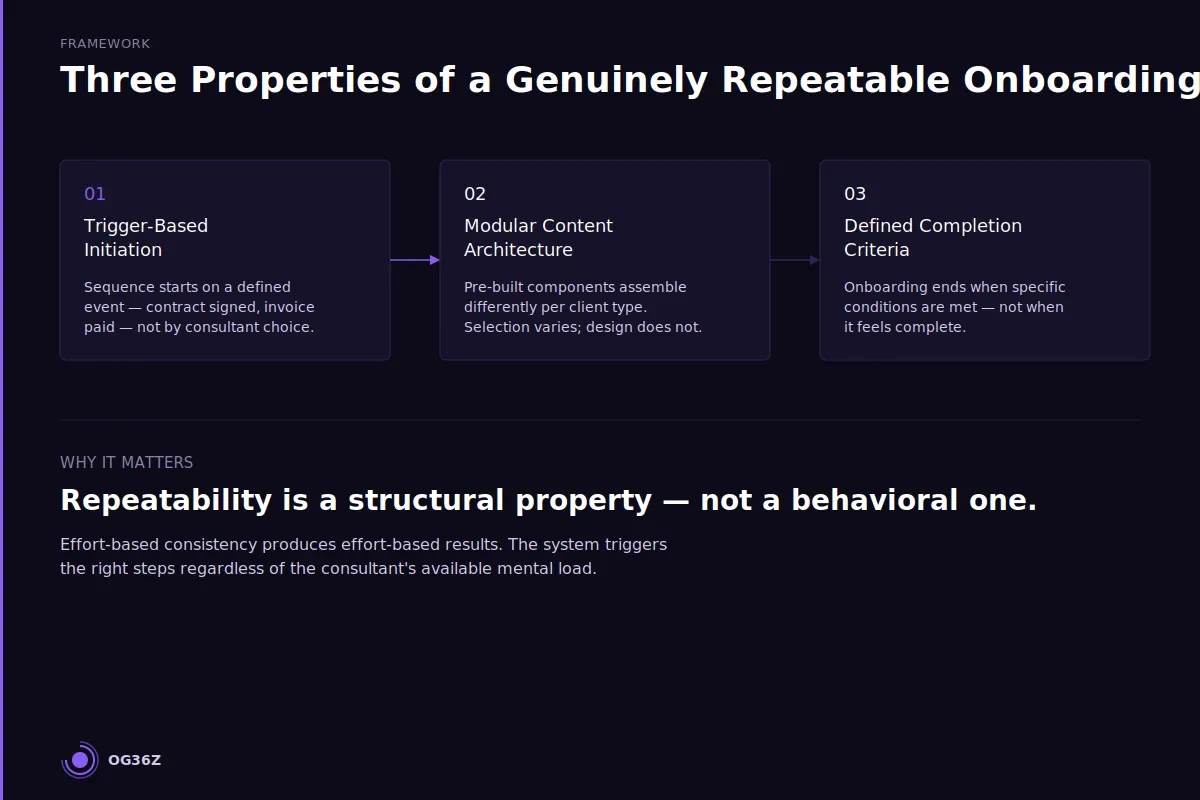
Three properties define a structurally repeatable onboarding process:
Trigger-based initiation. The onboarding sequence starts automatically when a defined event occurs — contract signed, invoice paid, or project confirmed. The consultant does not manually decide when to begin. The decision is embedded in the system. HubSpot workflows, Zapier automations, or even a Calendly booking confirmation can serve as the trigger.
Modular content architecture. The onboarding is not a single template — it is a set of interchangeable components that assemble differently for different client types. A discovery-phase client gets components A, C, and E. An implementation-phase client gets components B, D, and F. The components are pre-built; only the selection changes.
Defined completion criteria. Onboarding ends when specific conditions are met, not when it feels complete. These criteria are documented: the client has confirmed access to the project workspace, the kickoff document has been reviewed and signed off, the first milestone date is confirmed. Without defined completion, onboarding has no boundary, and confusion migrates into early delivery.
See The Client Onboarding Workflow Every Independent Consultant Needs for the foundational workflow that supports this structure.
How do you build modular onboarding components that work across client types?
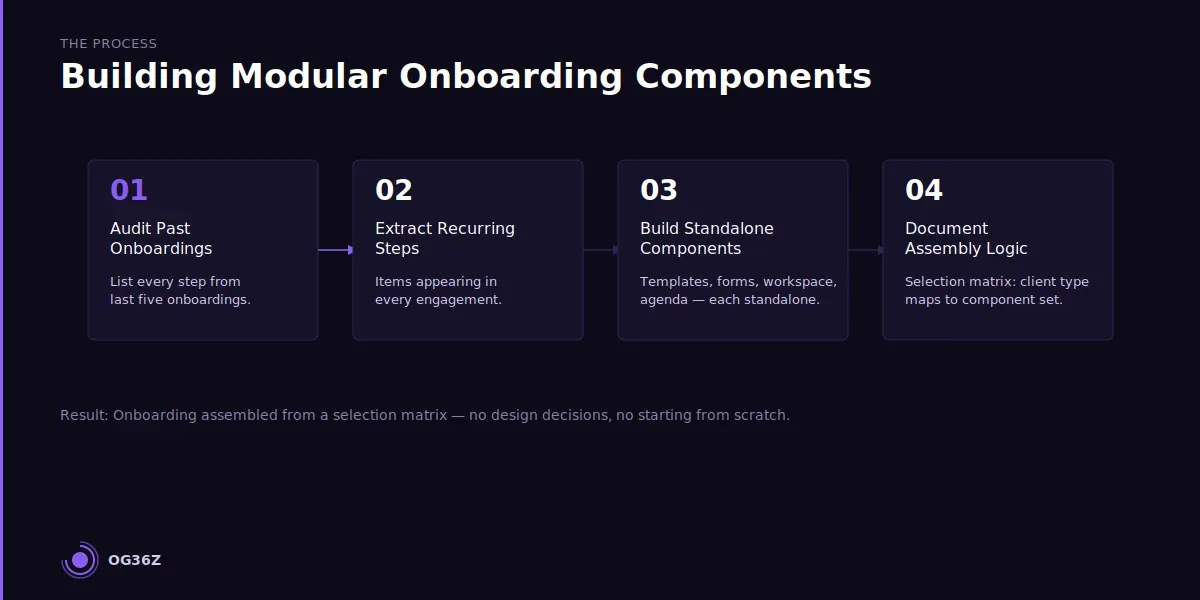
Modular onboarding components are pre-built, self-contained units of the onboarding sequence that each accomplish one discrete job and can be selected, ordered, and combined differently without redesigning the sequence. Building them requires first identifying every task that recurs across onboarding engagements, then extracting those tasks into reusable formats.
The starting point is an audit of previous onboarding sequences. Sana looks at the last five client onboardings and lists every step she completed: welcome email sent, intake form shared, Notion workspace set up, kickoff agenda prepared, contract file organized, communication channel established, first milestone scheduled. Most items appear in every engagement. These are candidates for modular components.
Each component becomes a standalone, reusable asset:
Welcome email template. One file. Two personalization fields: client name and engagement focus. Everything else — the tone, the structure, the reassurance that day one is covered — is fixed and tested. The welcome email takes ninety seconds to deploy, not twenty minutes to compose.
Intake form. A Typeform or Notion form that captures the client-specific context Sana needs before the kickoff meeting: key stakeholders, decision-making process, prior attempts to solve the problem, success definition, communication preferences. The form is identical for every client. The answers differ. The intake form replaces a thirty-minute pre-kickoff email thread.
Notion workspace template. A master Notion workspace with the standard project architecture — a goals page, a deliverables tracker, a communication log, a document library, a milestone calendar. Duplicating this template for a new client takes three minutes. Building it from scratch takes forty-five. See Consulting Client Onboarding Checklist: What to Cover in the First Week for the specific pages that belong in the workspace.
Kickoff agenda template. A structured agenda with fixed sections — introductions, project scope confirmation, success criteria, working rhythm, first week plan — and variable fields for client-specific content. The agenda is sent to the client 48 hours before the kickoff meeting as a pre-read. The meeting itself follows the agenda.
Milestone confirmation document. A one-page document that records the agreed deliverables, delivery dates, and review process. Both parties sign or acknowledge it at the end of the kickoff meeting. It becomes the reference document for the entire engagement.
The assembly logic — which components to include for which client type — is documented in a simple selection matrix: engagement type on one axis, client size on the other. Sana selects the intersection and assembles the onboarding from the indicated components. No design decisions. No starting from scratch.
What is the right balance between automation and personal touch in onboarding?
The right balance between automation and personal touch in consulting onboarding is a structural separation: automate delivery mechanics and systematize logistics, but reserve genuine human attention for moments of interpretation and relationship-building that automation cannot replicate credibly.
The failure mode in both directions is clear. Full automation produces a client experience that feels like a SaaS product onboarding — efficient, impersonal, and indistinguishable from every other consultant who bought the same CRM template. Full personalization — where Sana hand-crafts every communication — is unsustainable at volume and inconsistent when she is stretched thin.
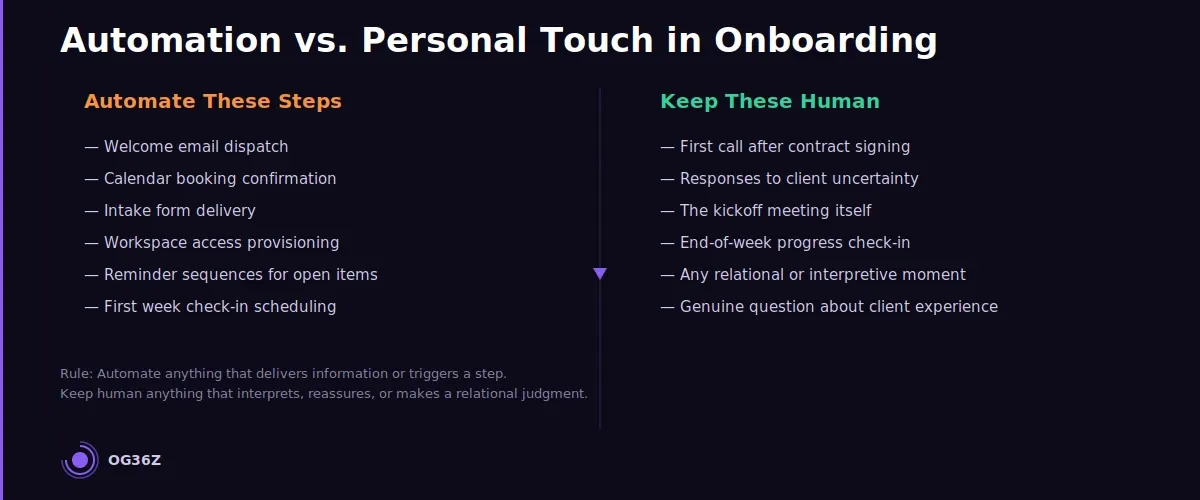
The distinction between what to automate and what not to automate follows a rule: automate anything that delivers information or triggers a step; keep human anything that interprets, reassures, or makes a relational judgment.
Automate: welcome email dispatch, calendar booking confirmation, intake form delivery, workspace access provisioning, reminder sequences for outstanding items, first week check-in scheduling, contract storage filing.
Keep human: the first phone or video call after contract signing, any communication that addresses uncertainty or concern the client raises, the kickoff meeting itself, the moment at the end of the first week where Sana confirms progress and asks one genuine question about the client's experience.
The personal touch protocol is as important as the automation layer. It defines the four to six moments in every onboarding where Sana's direct attention is non-negotiable. These moments are calendared, not improvised. Because everything else is automated, Sana has the time and mental bandwidth to be genuinely present in these moments rather than distracted by logistics.
The result from the client's perspective: every logistical step arrives on time, without friction, and the consultant is attentive and present at the exact moments that matter. This is indistinguishable, from the client's point of view, from a consultant who is extremely organized and highly personal. Because structurally, that is exactly what the system produces.
How do you use tools like HubSpot, Calendly, and Notion to systematize onboarding?
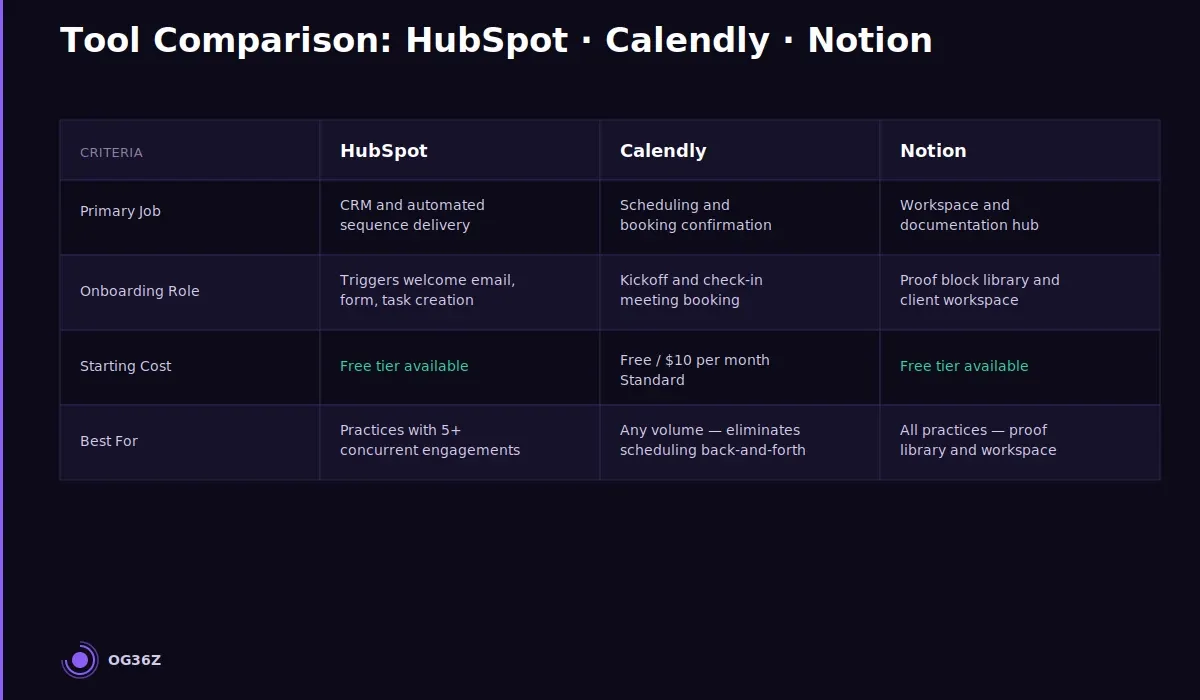
HubSpot, Calendly, and Notion each handle a distinct layer of the onboarding system — CRM and automation, scheduling and confirmation, and workspace and documentation respectively. The three tools cover the full onboarding sequence when configured to hand off between each other at the right moments.
The tool choice is secondary to the architecture. The question is not "which tool should I use?" but "which job does each tool handle, and how does output from one become input for the next?"
HubSpot handles the CRM layer and automation sequences. When a new engagement is created in HubSpot — triggered by a closed deal or signed contract — it kicks off an automated workflow: welcome email dispatch, intake form link delivery, onboarding task creation, and a timed sequence of follow-up reminders for outstanding items. HubSpot's free tier is sufficient for most solo consulting practices managing fewer than ten active clients. The paid tiers add deal pipeline tracking and more sophisticated sequence logic.
Calendly handles scheduling. The kickoff meeting, the first week check-in, and the end-of-onboarding review are all Calendly links embedded in the HubSpot workflow emails. The client books directly into Sana's calendar without a back-and-forth email thread. Calendly's confirmation and reminder emails are configured with the OG36Z brand voice — direct, specific, and free of filler language.
Notion handles workspace and documentation. The master Notion template is duplicated for each new client. The duplication takes three minutes. The workspace becomes the single source of truth for the engagement: project goals, deliverables, communication log, document library, and milestone tracker. Sharing the Notion workspace with the client on day one signals operational competence before the kickoff meeting occurs.
The handoff sequence: HubSpot triggers the welcome email → email contains the intake Typeform link and the kickoff Calendly link → client completes intake and books the kickoff → Calendly confirmation triggers the Notion workspace duplication task in HubSpot → Sana duplicates the template, shares access, and sends a one-line confirmation message.
For consultants not using HubSpot, the same handoff logic works with Zapier connecting Calendly bookings to Notion workspace creation tasks, with a simple email client handling the welcome sequence. The architecture matters more than the specific tools. See How to Run a Consulting Business Without Operations Staff for the full tool stack logic for solo practices.
How do you test and refine your onboarding process without disrupting active clients?
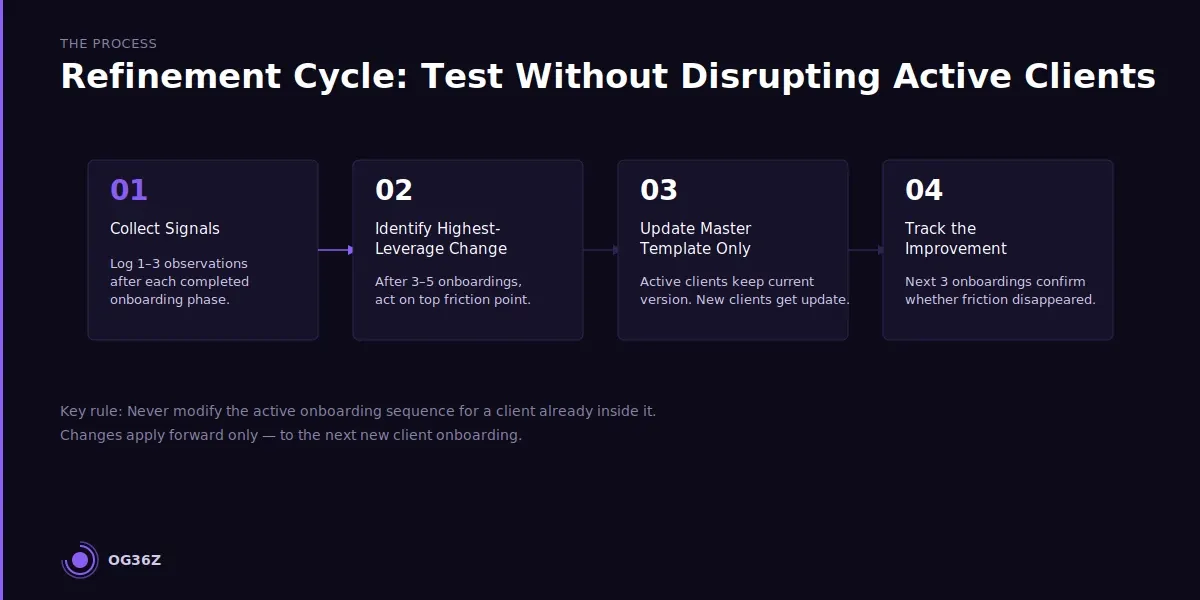
Testing and refining a consulting onboarding process without disrupting active clients requires a discipline that applies changes only to new client onboardings, not to those already in progress. The rule is simple: never modify the active onboarding sequence for a client already inside it.
The rationale is operational integrity. A client who experiences a different onboarding in week two than the one that started in week one notices. Inconsistency in the consultant's own process signals inconsistency in how they will manage the engagement. The client's confidence takes a hit at the exact moment it should be building.
The refinement process follows four steps:
Step 1: Collect signals from completed onboardings. After each client clears the onboarding phase and enters delivery, Sana records one to three observations: what created friction, what the client asked a clarifying question about, what step produced the most positive response. These observations go into a refinement log — a simple Notion database with one row per onboarding.
Step 2: Identify the highest-leverage change. After three to five completed onboardings, the log has enough signal to act on. The most common friction point becomes the first improvement target. A question the client asked repeatedly signals a gap in the welcome or intake documentation. A step that consistently produced positive feedback becomes a permanent fixture.
Step 3: Update the master template, not the active sequence. The change is made to the master Notion template, the HubSpot workflow, the welcome email draft, or whichever component is affected. Active clients continue with the version of the onboarding they started. New clients receive the updated version.
Step 4: Track the improvement. The next three onboardings using the updated component are monitored for the specific friction point that prompted the change. If the friction disappears, the change is confirmed. If it persists, the component is revised again.
This cycle — observe, identify, update the master, track the effect — runs quarterly at minimum, or after each completed onboarding if the practice is scaling. The system improves continuously without ever changing the experience of a client already in progress.
Summary
A repeatable consulting onboarding process is structural, not behavioral. It relies on trigger-based automation, modular components, and defined completion criteria — not the consultant's organizational discipline on any given week.
The right balance between automation and personal touch is a hard boundary: automate delivery mechanics, protect human attention for the moments of interpretation and relationship-building that matter.
HubSpot, Calendly, and Notion handle the three core layers of the onboarding system when configured to hand off between each other. The system improves through a disciplined refinement cycle that applies changes only to new onboardings, never to active ones.
Sana's clients do not see how the onboarding was built. They see that every step arrives on time, the workspace is ready before the kickoff meeting, and Sana is fully present when it counts. That experience — consistent, professional, personal — is what generates referrals and repeat work.