
How to Onboard a New Consulting Client in 48 Hours
A 48-hour client onboarding is not a pace question — it is a system question. Five automated triggers replace two weeks of fragmented email coordination: contract signature, welcome email, intake form, kickoff call scheduled, and kickoff brief delivered.
KEY TAKEAWAYS
- Every day between a signed contract and a running engagement erodes client confidence — a 48-hour onboarding system eliminates that gap.
- Five automated triggers — contract, welcome email, intake form, calendar invite, kickoff brief — replace two weeks of fragmented email threads.
- A single structured intake form collects all client context in one pass, ending the multi-round email chase before the engagement starts.
- Speed at the onboarding stage signals operational competence and increases project momentum before the first billable hour.
How do you onboard a new consulting client in 48 hours?
Onboarding a consulting client in 48 hours requires five automated triggers — contract sent, welcome email fired, intake form delivered, kickoff call scheduled, and pre-read brief completed — that run sequentially from the moment the engagement is signed.
The system replaces fragmented email coordination with a linear sequence that moves the client from signed contract to running engagement without manual follow-up at every step. Solo consultants who deploy this system reduce the time-to-value gap and signal operational competence before the first billable session begins.
CORE COMPONENTS:
- Contract-to-kickoff automation — five triggers that fire in sequence without manual intervention
- Structured intake form — a single form that collects all client context in one pass
- First meeting framework — a structured agenda that eliminates follow-up confusion
- Tool stack — the specific platforms that make 48-hour onboarding achievable solo
- Momentum signal — how speed at this stage increases project confidence
Every day between a signed contract and a running engagement is a day of eroding client confidence. The consultants who onboard in 48 hours are not working faster — they are working from a better system.
Sana's onboarding drags across two weeks. The contract goes out on Monday. The client signs Thursday. Sana sends a welcome email Friday, realizes she forgot to ask for system access, sends another email Monday, receives a partial response Wednesday, and schedules the kickoff call for the following week. By the time the engagement starts, the client has mentally moved on. Their enthusiasm from the proposal meeting has cooled. Early friction has already created doubt about whether this engagement will deliver.
The 48-hour onboarding is not about working faster. It is about replacing each manual coordination step with an automated trigger that fires the moment the previous step completes. Five triggers. One intake form. One structured kickoff meeting. That is the entire system.
What needs to happen for a client to be fully onboarded within 48 hours?
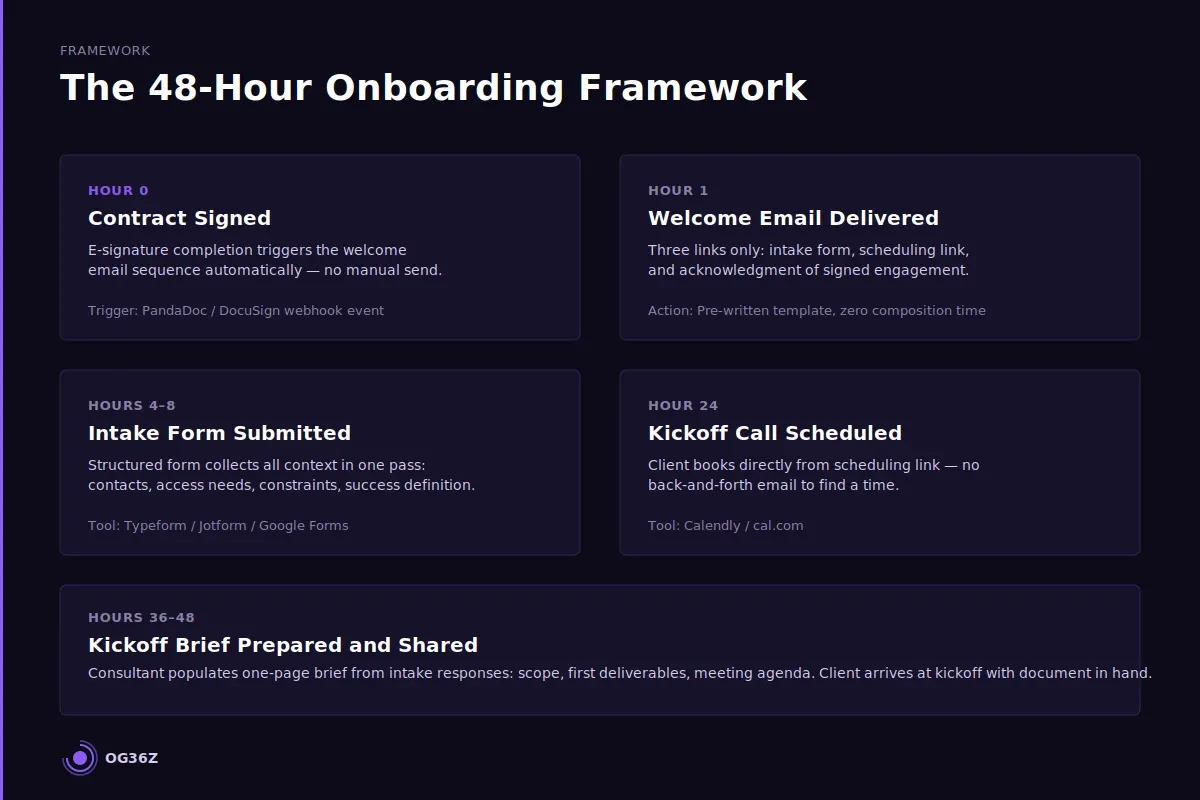
A client is fully onboarded within 48 hours when five conditions are met: the engagement agreement is signed, a welcome packet is delivered, a structured intake form is submitted, the kickoff call is scheduled, and the consultant has a pre-read brief ready for that call. Each condition is a milestone, and each milestone has a trigger that fires automatically when the previous one is complete.
The 48-hour clock starts at contract signature. Not at verbal agreement. Not at the proposal meeting. The moment the signed engagement document is received, the sequence begins.
Hour 0: Contract signed. The signed document triggers the welcome email automatically. In practice, this means the welcome email is pre-written, stored in the automation platform, and set to send the moment DocuSign or PandaDoc records a completed signature. The client receives it within minutes, not the following morning.
Hour 1: Welcome email delivered. The welcome email contains three things: a brief acknowledgment of the signed engagement, a link to the intake form, and a scheduling link for the kickoff call. It does not ask the client to do anything else. One email. Three links. Nothing more.
Hour 4–8: Intake form submitted. The structured intake form collects every piece of client context the consultant needs before the kickoff call: primary contact names, relevant stakeholder roles, system access requirements, project constraints, and the client's own language for the core problem. The form is not a questionnaire with twenty open-ended fields. It is a structured form with defined field types that takes fifteen minutes to complete.
Hour 24: Kickoff call scheduled. The scheduling link in the welcome email connects to a calendar tool — Calendly or cal.com — that shows available slots within the next 48 to 72 hours. The client books directly. No email back-and-forth to find a time.
Hour 36–48: Kickoff brief prepared. The consultant receives the intake form responses automatically and uses them to populate the kickoff brief: a one-page document covering the engagement scope, the agreed-upon first deliverables, and the meeting agenda. The client arrives at the kickoff call with a document in hand.
When all five conditions are met within 48 hours, the client enters the kickoff meeting having already provided their context, seen evidence of the consultant's systems, and received a structured agenda. The meeting can move directly to work.
How do you automate the contract-to-kickoff sequence?
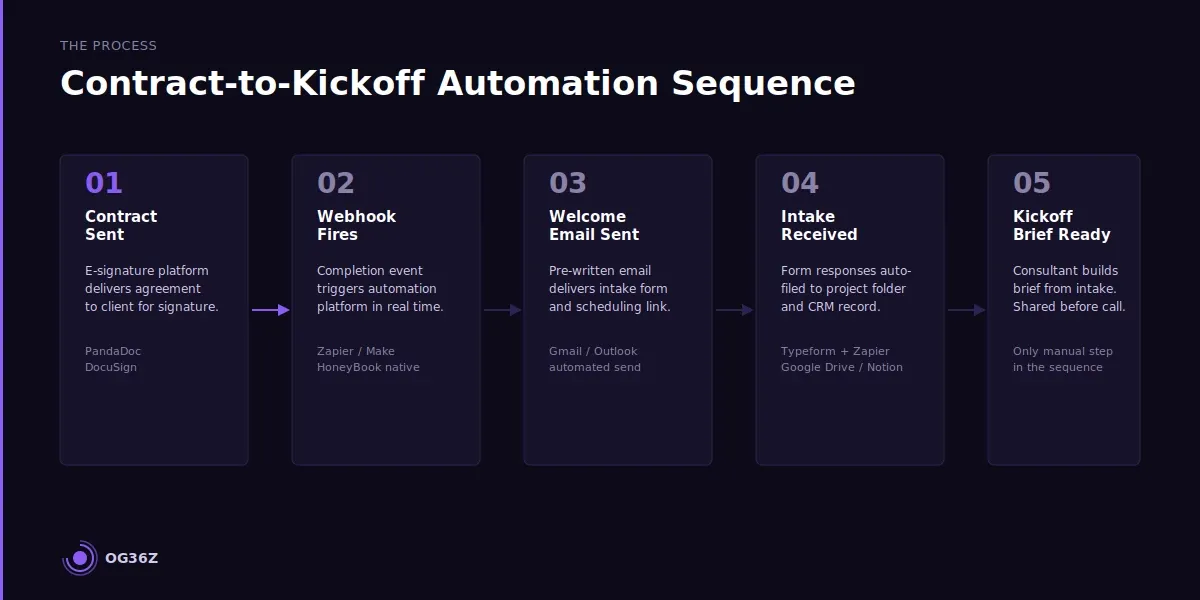
The contract-to-kickoff sequence automates through a three-platform stack: an e-signature tool, an automation platform, and a scheduling tool. The signature triggers a webhook, the webhook fires the automation, the automation sends the welcome email with the intake form and scheduling link. No manual step exists between signature and scheduled kickoff call.
The specific implementation depends on the tools already in the consultant's stack, but the logic is platform-agnostic. PandaDoc and DocuSign both support webhook events on completion. HoneyBook and Dubsado bundle this trigger natively inside their proposal-to-project pipeline. For consultants using a standalone CRM like HubSpot or a lightweight tool like Notion with Zapier, the same trigger-action logic applies.
The automation sequence in five steps:
The contract is sent via e-signature platform. When the platform records a completed signature, it fires a completion event. That event triggers the automation platform — Zapier, Make, or a native workflow in HoneyBook or Dubsado — to execute the following actions in order: send the pre-written welcome email, tag the new client record in the CRM, create the project folder in the file storage system, and add the client intake form response as a watched form. Each action takes seconds. The consultant is not involved.
The welcome email lands in the client's inbox within minutes of the signed contract. The intake form link inside that email is pre-built and specific to the engagement type — strategy engagements use one form, implementation engagements use another. The scheduling link shows real availability from the consultant's calendar.
When the intake form is submitted, the automation fires a second time: the responses are sent to the consultant via email, added to the project folder, and the CRM record is updated to show intake complete. A reminder email to the client — "Here is what to expect at our kickoff call" — fires automatically 24 hours before the scheduled meeting.
The only manual step in this entire sequence is the 30-minute work the consultant does to populate the kickoff brief from the intake form responses. That is the only legitimate human task in the process. See The Client Onboarding Workflow Every Independent Consultant Needs for the full workflow architecture and field-by-field setup guide.
What is the fastest way to collect client information without multiple email threads?
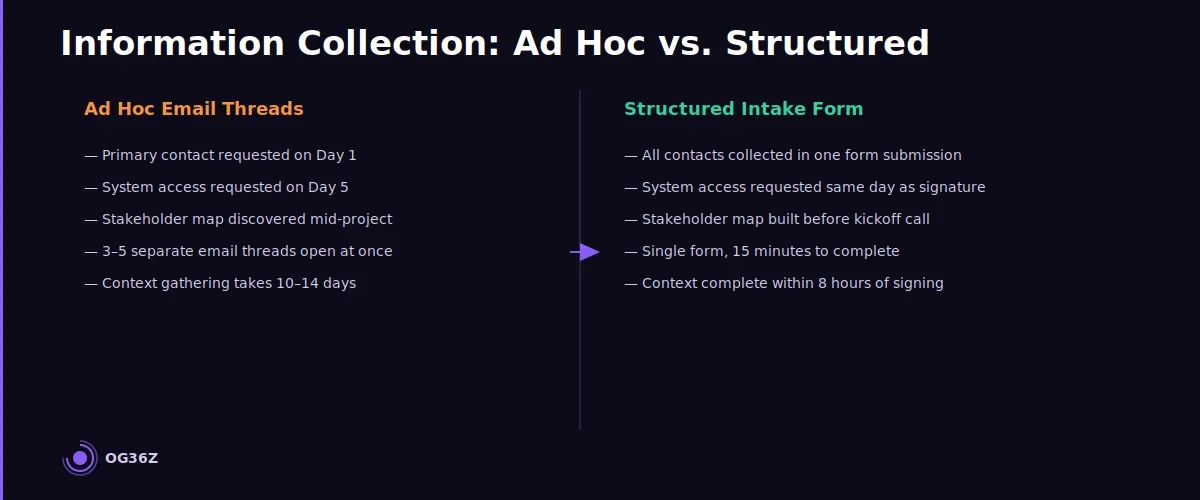
The fastest way to collect client information is a single structured intake form that replaces every ad hoc email request with one comprehensive pass. The form asks for everything the consultant needs before the kickoff call — contacts, access requirements, constraints, and the client's own language for the core problem — and it asks once.
The failure mode in most solo consulting onboarding is information collection by email. Sana sends one email asking for the primary contact. The client responds three days later. Sana sends another email asking for system access. The client asks IT. IT responds a week later with partial credentials. Sana sends a follow-up asking about the reporting structure. By this point, the client is fielding the third email before the engagement has started. The friction is real, and it communicates disorganization.
A structured intake form eliminates this entirely. The form is built once and reused across every engagement of the same type. It covers seven categories:
Primary contacts. Full name, role, preferred communication channel, and the best time to reach them. This field prevents the consultant from emailing the wrong person for the first three weeks.
Stakeholder map. The two or three additional stakeholders whose input or approval will affect the engagement — their names, roles, and relationship to the primary contact. Collected upfront, not discovered mid-engagement.
System access. Which platforms, tools, or data sources the consultant will need access to. This field generates the IT access request the same day the form is submitted, not after the first meeting reveals the gap.
Engagement constraints. Hard deadlines, budget parameters, internal review cycles, and any known complications. The client has this information; asking for it in a structured format forces clarity before the work starts.
The problem in their words. A short open-text field asking the client to describe the core challenge in their own language. This field populates the problem statement in the kickoff brief and confirms that the consultant's understanding matches the client's.
Success definition. What does a successful engagement look like at the 30-day and 90-day mark? This field surfaces misalignment before it costs either party time.
Reference materials. Links to relevant documents, reports, or prior work the consultant should review before the kickoff call.
Typeform, Jotform, and Google Forms all support this structure. HoneyBook and Dubsado include intake form builders natively. The platform is secondary. The discipline of asking everything once, in a structured format, is what eliminates the multi-thread email chase. See How to Build a Repeatable Onboarding Process That Impresses Every Client for the intake form template and field-by-field guidance.
How do you structure the first client meeting to eliminate follow-up confusion?
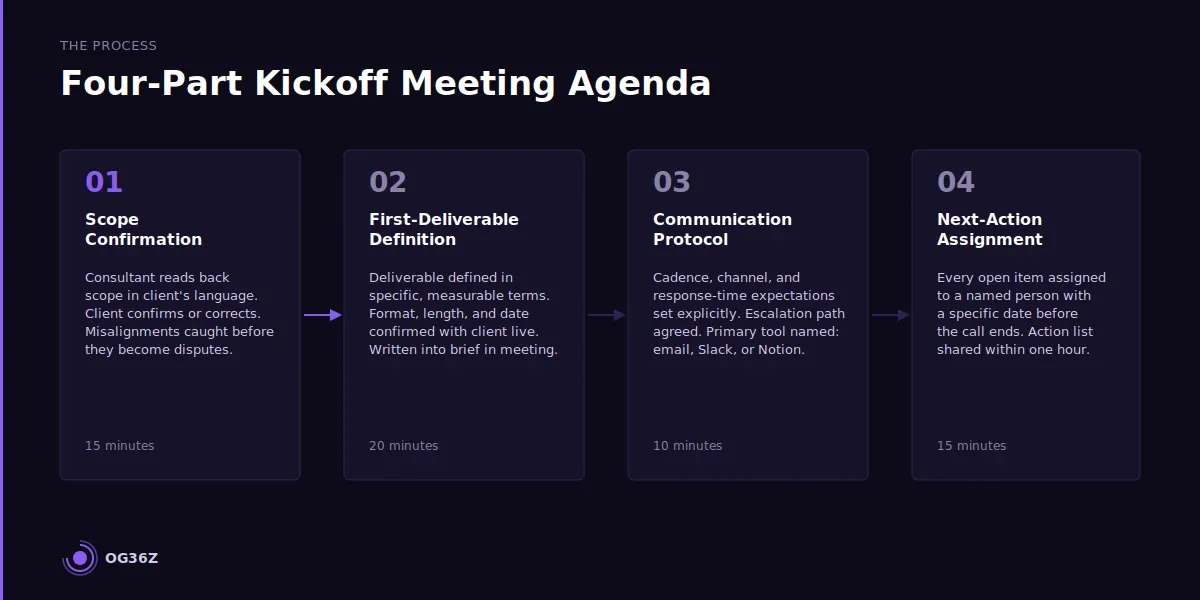
The first client meeting eliminates follow-up confusion when it follows a four-part agenda that closes every open item before the meeting ends: scope confirmation, first-deliverable definition, communication protocol, and next-action assignment. A meeting that ends without assigned actions and specific dates generates follow-up emails. A meeting that ends with every item closed does not.
The kickoff meeting is not a getting-to-know-you call. It is an operational alignment session. The client has already provided their context via the intake form. The consultant has already reviewed the engagement terms. The 60-minute meeting has one job: move from signed agreement to active project with no ambiguity about what happens next.
Part 1: Scope confirmation (15 minutes). The consultant reads back the engagement scope — in the client's language, not proposal language — and asks the client to confirm or correct. This step catches scope misalignments before they become mid-project disputes. The kickoff brief document makes this concrete: both parties are looking at the same text and agreeing on its meaning.
Part 2: First-deliverable definition (20 minutes). The first deliverable is defined in specific, measurable terms. Not "a strategic assessment" — "a five-page strategic assessment covering the three priority areas identified in the intake form, delivered as a Google Doc by March 7." Specificity at this stage eliminates ambiguity about what done looks like. The consultant writes the deliverable definition into the kickoff brief during the meeting, with the client watching.
Part 3: Communication protocol (10 minutes). The communication cadence is established explicitly. How often will the consultant provide updates? Which channel — email, Slack, or a project management tool like Notion or Asana — is the primary communication channel? What is the expected response time for questions from either side? What is the escalation path if something goes wrong? These decisions take ten minutes to make and prevent months of communication friction.
Part 4: Next-action assignment (15 minutes). Every open item from the meeting is assigned to a named person with a specific date. The consultant captures each item in real time and shares the complete action list at the end of the meeting. The client receives the list within an hour of the meeting ending — via email or directly in the shared project space. See The Client Kickoff System for Independent Consultants for the complete kickoff brief template and meeting script.
What tools make 48-hour onboarding possible for solo consultants?
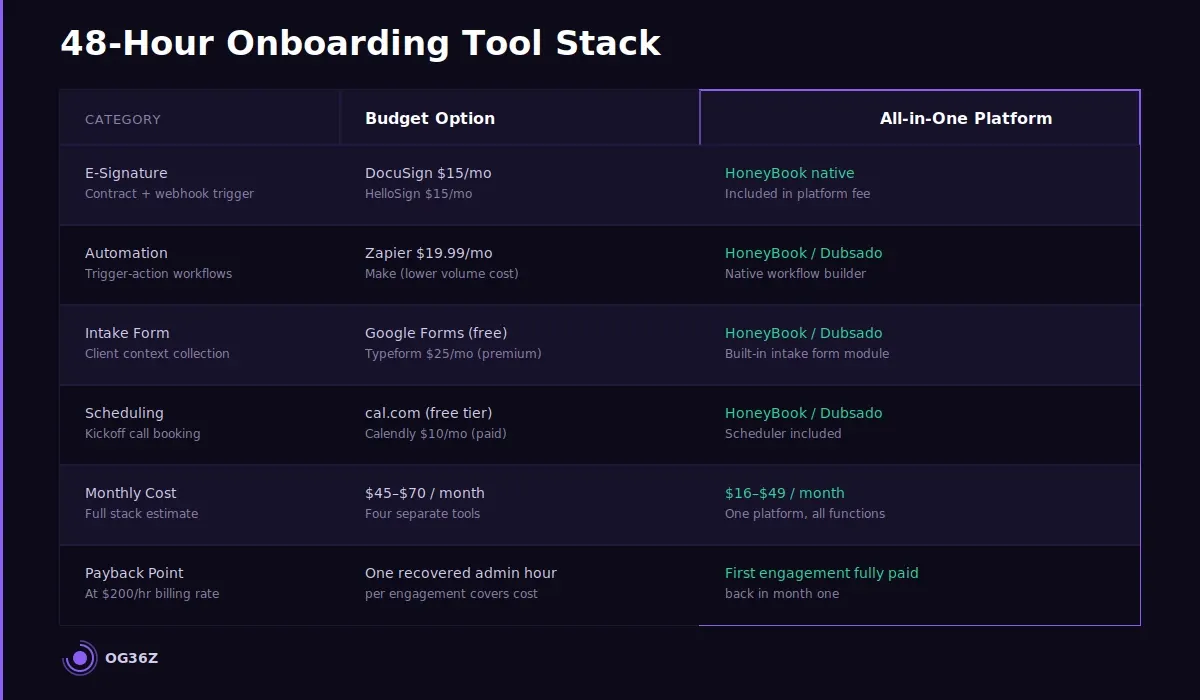
The 48-hour onboarding system requires four tool categories: an e-signature platform, an automation platform, a form builder, and a scheduling tool. Each category has a practical option for every budget level — the system does not require enterprise software.
E-signature. PandaDoc ($19/month) and DocuSign ($15/month) both support webhook completion events, which is the technical requirement for automated trigger-based onboarding. HelloSign ($15/month) provides the same capability. For consultants already using HoneyBook or Dubsado, the built-in proposal and contract module handles signature and trigger natively. The selection criterion is whether the tool fires a completion event that an automation platform can receive.
Automation platform. Zapier ($19.99/month at the Starter tier) connects the e-signature completion event to every downstream action — welcome email, CRM tag, folder creation, form assignment. Make (formerly Integromat) offers the same capability at a lower price point for higher-volume workflows. HoneyBook and Dubsado include native automation builders that eliminate the need for a third-party platform entirely.
Form builder. Typeform ($25/month) produces the most professional client-facing experience for intake forms, with conditional logic that shows or hides fields based on engagement type. Jotform ($34/month) offers more customization at a higher price. Google Forms is free and functional for consultants in the early stages of systematizing who are not yet willing to pay for form infrastructure. The platform matters less than the form's field architecture — a well-structured Google Form outperforms a poorly designed Typeform.
Scheduling tool. Calendly ($10/month) and cal.com (free at the basic tier) both integrate with Google Calendar and Outlook, show real availability, and prevent double-booking. Both allow the consultant to set buffer time before and after each type of meeting. The scheduling link in the welcome email connects directly to a kickoff call slot type with the correct duration and buffer pre-configured.
The total cost of the four-tool stack ranges from $0 (Google Forms, cal.com free tier, and a bundled platform like HoneyBook) to approximately $70/month for the premium tier of each tool. At Sana's billing rate, one recovered hour of admin time per engagement more than covers the monthly subscription cost of the entire stack.
Summary
A 48-hour client onboarding is not a pace question — it is a system question. Five automated triggers replace two weeks of fragmented email coordination: contract signature, welcome email, intake form, kickoff call scheduled, and kickoff brief delivered.
The intake form collects every piece of client context in one structured pass, eliminating the multi-thread email chase that erodes early client confidence.
The kickoff meeting follows a four-part agenda that closes every open item with a named owner and specific date before the call ends.
The tool stack costs between $0 and $70 per month and pays back in the first recovered hour of admin time.
Speed at this stage is a signal — clients read operational competence from a consultant who has a running engagement in place before the end of the first business week.