
Managing Multiple Client Contexts as a Solo Consultant
Context-switching between consulting clients is not a focus problem — it is a retrieval problem. The 20-minute re-orientation cost is not the inherent price of switching; it is the price of switching without a structured retrieval system.
KEY TAKEAWAYS
- Context-switching between clients costs 20+ minutes per transition — this is a retrieval problem, not a focus problem
- A client context card collapses orientation time from 20 minutes to 90 seconds when built correctly
- The card system works only when updates take less than two minutes — friction is the failure mode
- Structuring your week into client blocks, not task blocks, reduces context-switch events by 60 to 80 percent
What is the fastest way to manage multiple client contexts without cognitive collapse?
Build a standardized client context card for each engagement — a single-page record containing current status, open threads, stakeholder map, and active decisions. Load the card before every client session. Update it in two minutes after. The transition time drops from 20 minutes to 90 seconds.
CLIENT CONTEXT CARD CONTENTS:
- Current status — where the engagement stands in one sentence
- Open threads — unresolved decisions, pending items, waiting-on list
- Stakeholder map — key contacts, their priorities, their communication preferences
- Active decisions — choices made this week that context requires
- Next session goal — the single outcome needed from the next interaction
- Terminology glossary — client-specific language, internal acronyms, product names
Sana manages four active clients on any given week. On Tuesday she has a morning call with a SaaS company working on pricing strategy, an afternoon session with a logistics operator on process redesign, and a late-day check-in with a financial services firm on a vendor evaluation. Each client uses different terminology. Each has different internal politics. Each has a different set of open threads from last week that she needs to hold in working memory.
By the time she hits the third call, she has already spent 45 minutes across the day re-orienting — pulling up notes, scanning email threads, reconstructing context that should have been instantly accessible. That 45 minutes is not a productivity failure. It is an information architecture failure. And it compounds across the week.
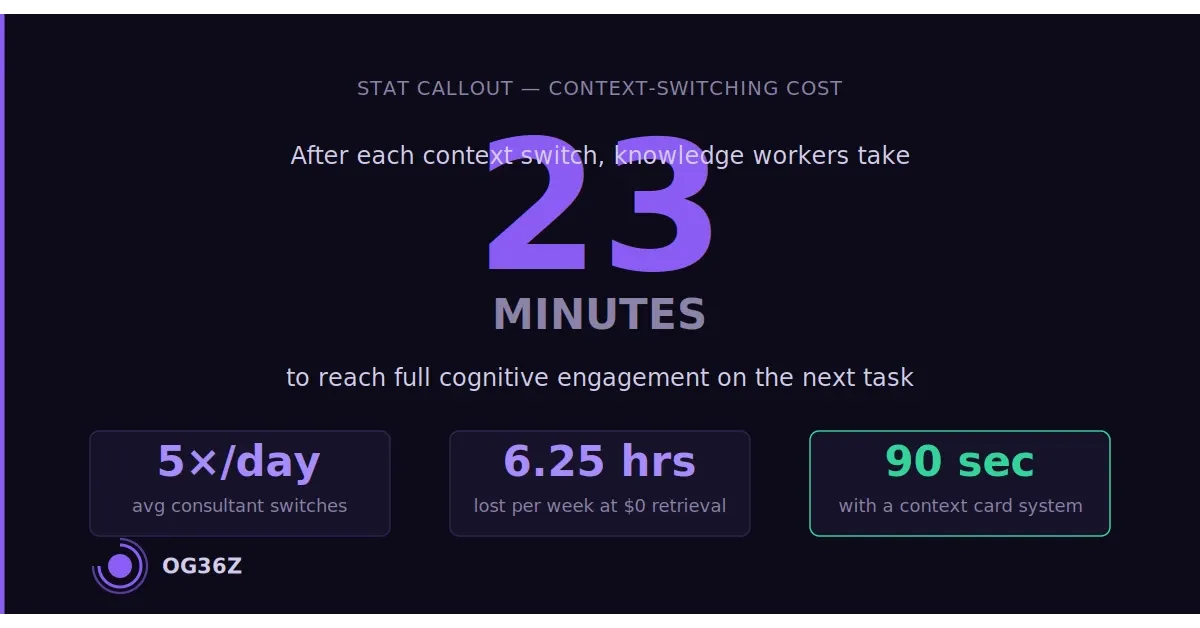
At five context switches per day, five days per week, even a conservative 15-minute re-orientation cost produces 6.25 hours of wasted time per week. At $250 per hour, that is over $1,500 in unbilled capacity — every week, from context-switching alone. The solution is not better focus. It is a retrieval system that makes re-orientation take 90 seconds instead of 20 minutes.
What is the actual cognitive cost of context-switching between consulting clients?
The research on context-switching is unambiguous: the cognitive cost is not just the time lost to transition — it is the degraded performance during the work that follows. Studies on knowledge workers consistently show that after a context switch, it takes 20 to 23 minutes to reach full task engagement again. For consulting work, where the value delivered depends on the quality of thinking applied to a specific client's situation, that degradation is visible in the output.
For independent consultants managing multiple engagements, the problem is structural. Unlike employees who move between projects within a single organizational context, solo consultants switch between entirely different companies — different industries, different leadership teams, different problems, different stakes. The cognitive re-loading required is not light context management; it is a near-complete working memory refresh.
The compounding effects are underappreciated. A consultant who context-switches five times per day does not lose five periods of 20 minutes in pure dead time. They lose that time plus the quality degradation on work done in a fragmented state, plus the decision fatigue that accumulates from managing multiple incomplete threads simultaneously, plus the error risk from misapplying information from one client context to another — a mistake that is rare when memory is fresh and common when it is strained.
The good news is that context-switching cost is not fixed. It is a function of retrieval friction. When the client context card exists and is current, re-orientation takes 90 seconds: open the card, read the current status, scan the open threads, load the next session goal. The cognitive load of re-entering a client context is reduced to what the brain can handle in a focused 90-second read. The 20-minute cost is not the inherent price of context-switching — it is the price of context-switching without a retrieval system.
What is a client context card and what does it contain?
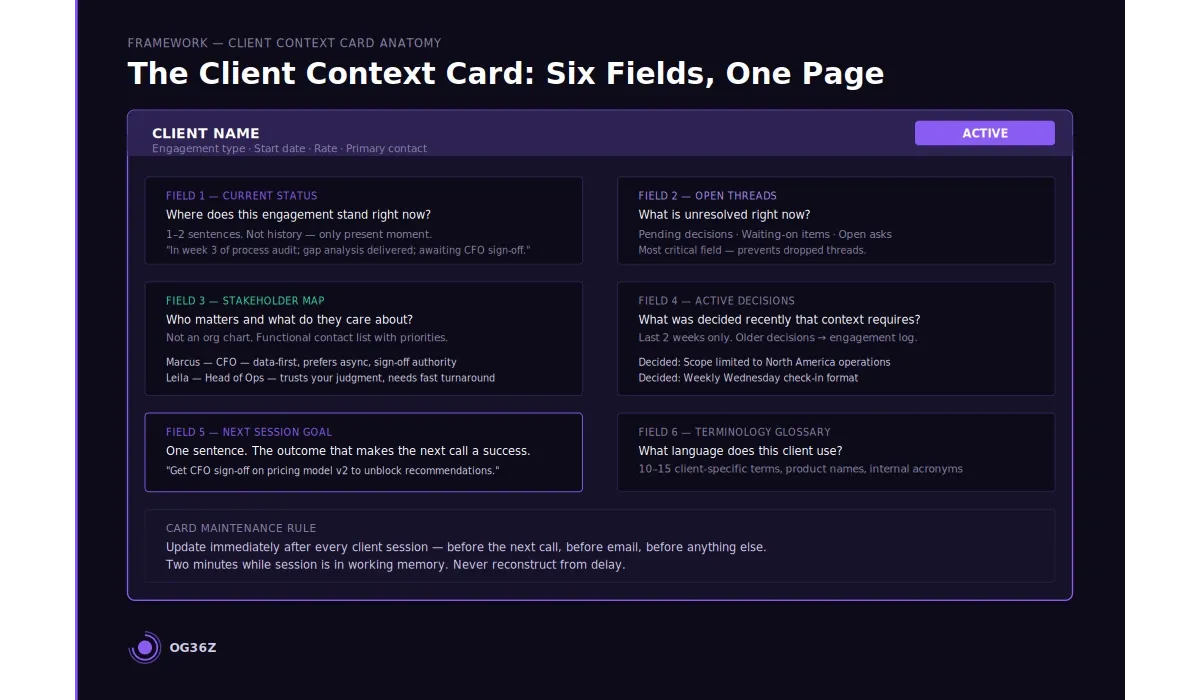
A client context card is a single-page living document that contains everything needed to re-enter a client engagement in under 90 seconds. It is not a project plan, not a full notes archive, and not a comprehensive record of the engagement. It is a working memory proxy — a structured snapshot of current state.
The card has six fields. Each field answers a specific question that the brain asks when re-entering a context.
Current status answers: where does this engagement stand right now? One to two sentences. Not project history — only the present moment. "In week three of the process audit; delivered the gap analysis; awaiting sign-off from CFO before proceeding to recommendations phase."
Open threads answers: what is unresolved? A numbered list of pending items, decisions awaiting input, and items where you are waiting on the client. This is the most critical field for preventing errors. A consultant who cannot recall what is waiting-on in a client engagement will either duplicate the ask, miss the follow-up, or make a decision based on outdated assumptions.
Stakeholder map answers: who are the relevant people and what do they care about? Not an org chart — a functional list of the contacts you interact with, their role in the engagement, their priorities, and their communication preferences. "Marcus — CFO — detail-oriented, wants data before decisions, prefers async"; "Leila — Head of Ops — trusts your judgment, needs quick turnarounds."
Active decisions answers: what was decided recently that context requires? Decisions made in the last two weeks that affect how the next session should proceed. After one month, these migrate to an engagement log and the field resets.
Next session goal answers: what is the single outcome needed from the next interaction? One sentence. Not a full agenda — the one thing that would make the next session a success.
Terminology glossary answers: what language does this client use? A 10-to-15 item list of client-specific terms, internal product names, acronyms, and preferred phrasings. This field prevents the subtle credibility damage that occurs when a consultant uses the wrong term for a client's internal concept.
How do you build a context card system that is fast to update?
The context card system fails when updates take more than two minutes. If a consultant has to navigate to the card, find the right field, reconstruct what happened in a session, and write a coherent update, the system becomes a burden — and a burden gets skipped. Skipped updates mean stale cards. Stale cards mean the 90-second re-orientation becomes 15 minutes of card validation before it can be trusted.
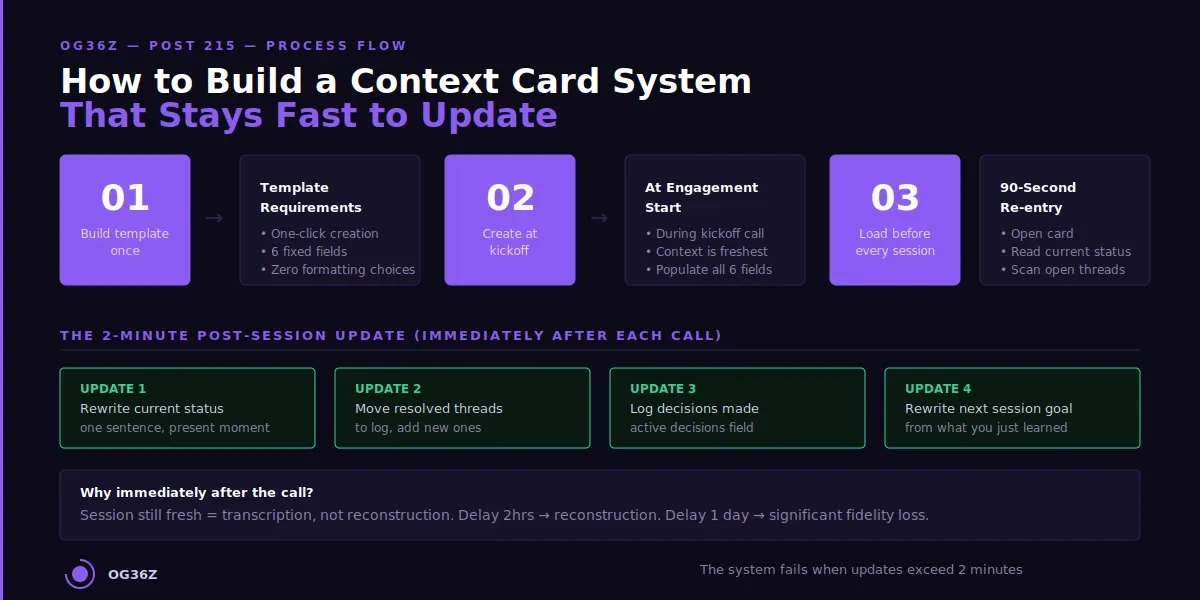
The solution is a post-session update ritual that takes exactly two minutes and follows a fixed script.
Immediately after each client session — before the next call, before email, before anything else — open the context card and run four updates. Update the current status sentence. Move resolved open threads to the engagement log and add any new ones. Log any decisions that were made. Rewrite the next session goal based on what you just learned.
The two-minute update works because the session is still fresh. When you do the update immediately after the call, you are not reconstructing — you are transcribing from working memory. Delay the update by two hours and reconstruction becomes the task, not transcription. Delay it by a day and you have lost significant fidelity.
Build the template once. The template should be a fixed-format document that opens instantly and requires only typing into existing fields — no formatting decisions, no structural choices, no friction of any kind. Notion database templates, Obsidian templates with the Templater plugin, or even a Google Doc with named sections all work. The critical requirement is one-click creation and two-minute completion.
Create the card at engagement start, not after. The first card for a new client should be created during the kickoff call or immediately afterward, while the initial context is crisp. The stakeholder map, terminology glossary, and current status are easiest to populate at engagement start than at any point later.
See Post 212 for the full client knowledge system framework that the context card integrates into.
How do you structure your week to minimize context-switching cost?
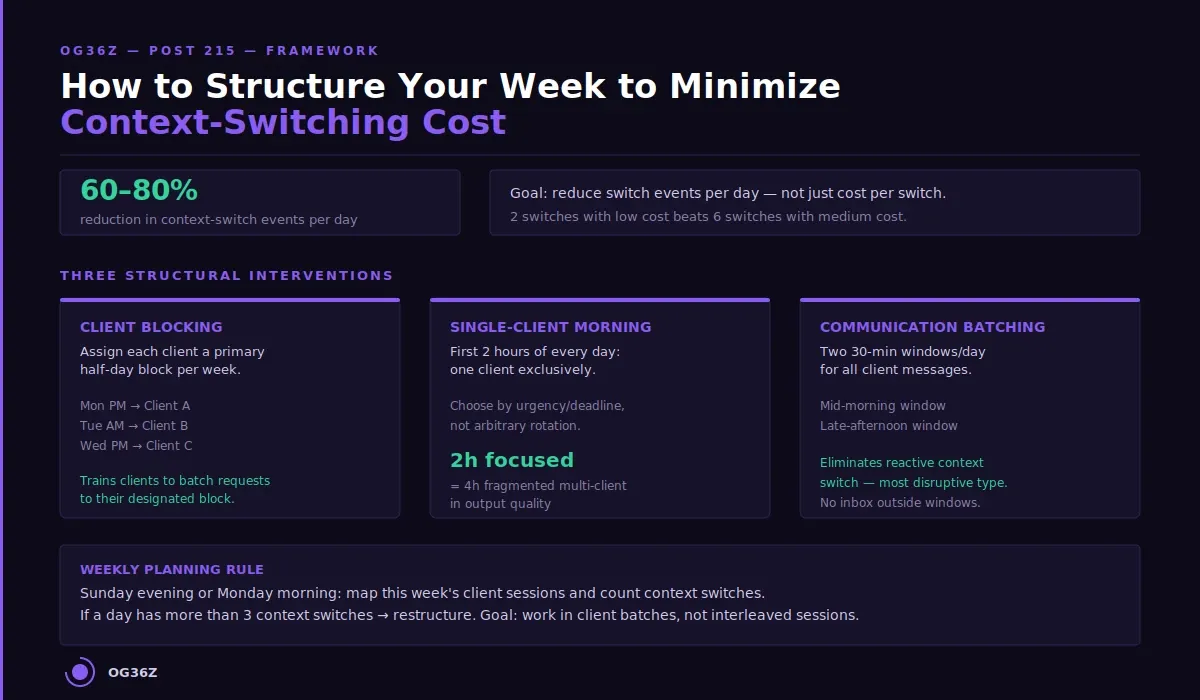
Even with a perfect context card system, frequent switching is expensive. The structural solution is to reduce the number of context-switch events per day, not just to reduce the cost per switch. A consultant who has two client sessions per day with one switch performs better than one who has six sessions with five switches — even if the total client hours are identical.
Client blocking is the primary scheduling intervention. Assign each client a primary half-day block per week rather than scattering sessions across the schedule. A client who gets Monday afternoon as their consistent block produces fewer context switches than one whose sessions land at random across the week. The blocking also trains clients to batch their requests and communications toward their designated time, reducing the asynchronous context-switch cost of email and Slack.
The single-client morning rule is the most aggressive form of client blocking. For the first two hours of every workday, work on one client exclusively. Choose the client based on urgency or deadline, not arbitrary rotation. Two hours of uninterrupted single-client work is worth more than four hours of fragmented multi-client work — both in output quality and in the cognitive energy available for the rest of the day.
Communication batching compounds the scheduling benefit. Instead of responding to client messages as they arrive, designate two 30-minute communication windows per day — mid-morning and late afternoon — where you process all client communications together. This eliminates the reactive context switch, which is the most disruptive type because it happens without preparation or the 90-second card review.
Weekly planning should explicitly map client context switches. On Sunday evening or Monday morning, lay out the week's client sessions and count the switches. If a day has more than three context switches, restructure it. The goal is to work in client batches — all SaaS Co work in one block, all logistics client work in another — rather than interleaving.
What tools support fast context retrieval for multi-client consulting work?
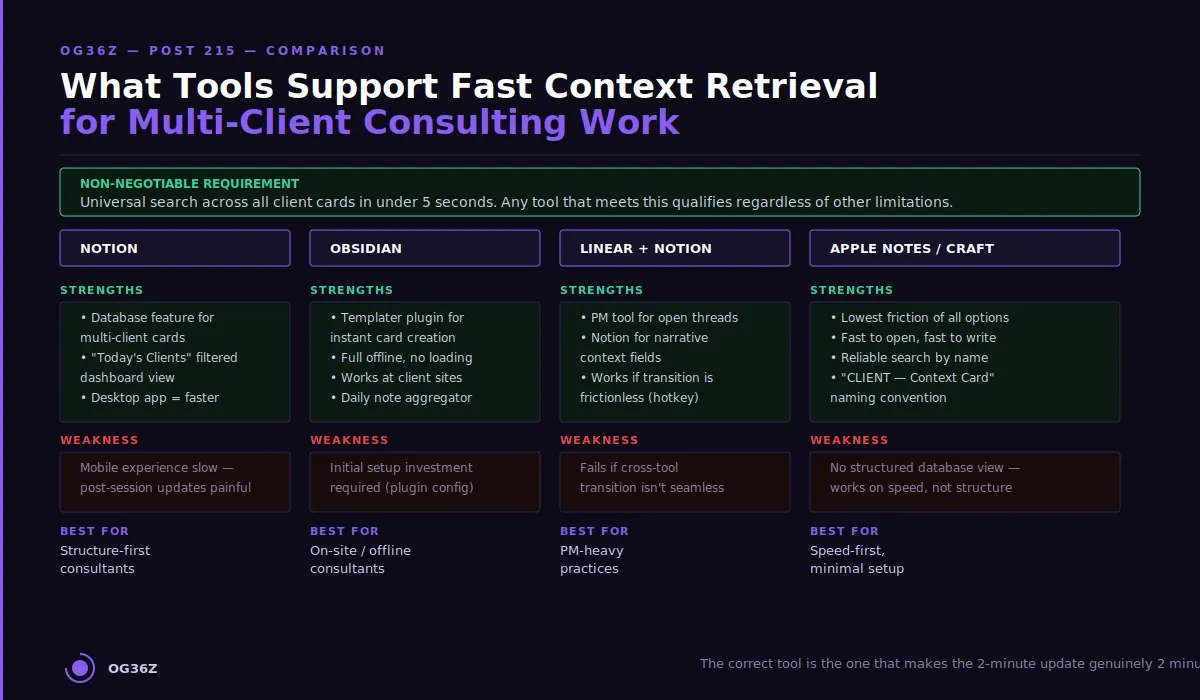
The context card system is tool-agnostic, but tool friction is real. The correct tool is the one that makes the two-minute update genuinely two minutes — not three with navigation overhead, not four with loading time, not five with formatting decisions. On a day with six client sessions, that friction compounds to wasted minutes that undermine the entire system.
Notion handles multi-client context cards well through its database feature. Create a Clients database with each client as a row, and build a template for the context card fields. Filtered views let you build a "Today's Clients" dashboard that shows only the cards relevant to today's sessions, reducing navigation time. The Notion desktop app loads faster than the browser version — use it. Weakness: the mobile experience is slow, making post-session mobile updates painful if you are moving between locations.
Obsidian with the Templater plugin creates context card templates that open instantly. Each client gets a dedicated note with the six fields. The daily note can link to all active client cards, creating a single "today's context" page that aggregates the relevant cards without duplication. The file-based storage means no loading time and works fully offline — relevant for consultants who do client sessions at client sites. Weakness: requires initial setup investment.
Linear and Notion paired: some consultants use a project management tool for open threads and a separate document for the narrative context fields. This works if the transition between the two tools is frictionless — a keyboard shortcut or a pinned tab, not a navigation journey.
Apple Notes or Craft with a consistent naming convention (CLIENT NAME — Context Card) is the lowest-friction option. Fast to open, fast to write, reliable search. Lacks the structured database view of Notion but delivers speed that more complex tools cannot match.
The non-negotiable feature: universal search that works across all client cards simultaneously. If you can type a stakeholder name and surface the relevant card in under five seconds, the tool qualifies regardless of its other limitations.
See Post 210 for the broader knowledge management system that the context card lives within. See Post 228 for how to manage four or more client engagements concurrently without a project manager.
Summary
Context-switching between consulting clients is not a focus problem — it is a retrieval problem. The 20-minute re-orientation cost is not the inherent price of switching; it is the price of switching without a structured retrieval system. A client context card with six fields — current status, open threads, stakeholder map, active decisions, next session goal, and terminology glossary — collapses that cost to 90 seconds.
The card system works only when updates are genuinely fast. The two-minute post-session update ritual, executed immediately after each call while the session is still in working memory, keeps the card current with near-zero additional effort.
Scheduling intervention multiplies the gain. Client blocking, the single-client morning rule, and communication batching reduce the number of context-switch events per day, not just the cost per switch. A consultant managing four clients who schedules two context switches per day outperforms one who manages three clients with six switches per day.
The total system — card plus ritual plus scheduling — is recoverable in the first week of implementation. For a consultant billing at $250 per hour, recovering five hours per week of re-orientation time returns $1,250 in billable capacity immediately.