
Cursor vs. Claude Code for Independent Consultants: Which One Builds Your AI Practice Faster?
For a solo consultant building an AI practice, the choice is not which tool is better in general — it is which tool fits the specific task at hand.
KEY TAKEAWAYS
- Cursor is a VS Code-based AI editor; Claude Code is an autonomous terminal agent — different tools with different jobs.
- Claude Code uses 5.5× fewer tokens than Cursor for identical tasks, making it cheaper at scale for complex work.
- For building AI agents and automating consultant workflows, Claude Code's MCP integrations have a structural edge.
- Cursor's visual interface is faster for code exploration; Claude Code is faster for autonomous multi-step execution.
What is the difference between Cursor and Claude Code for consultants?
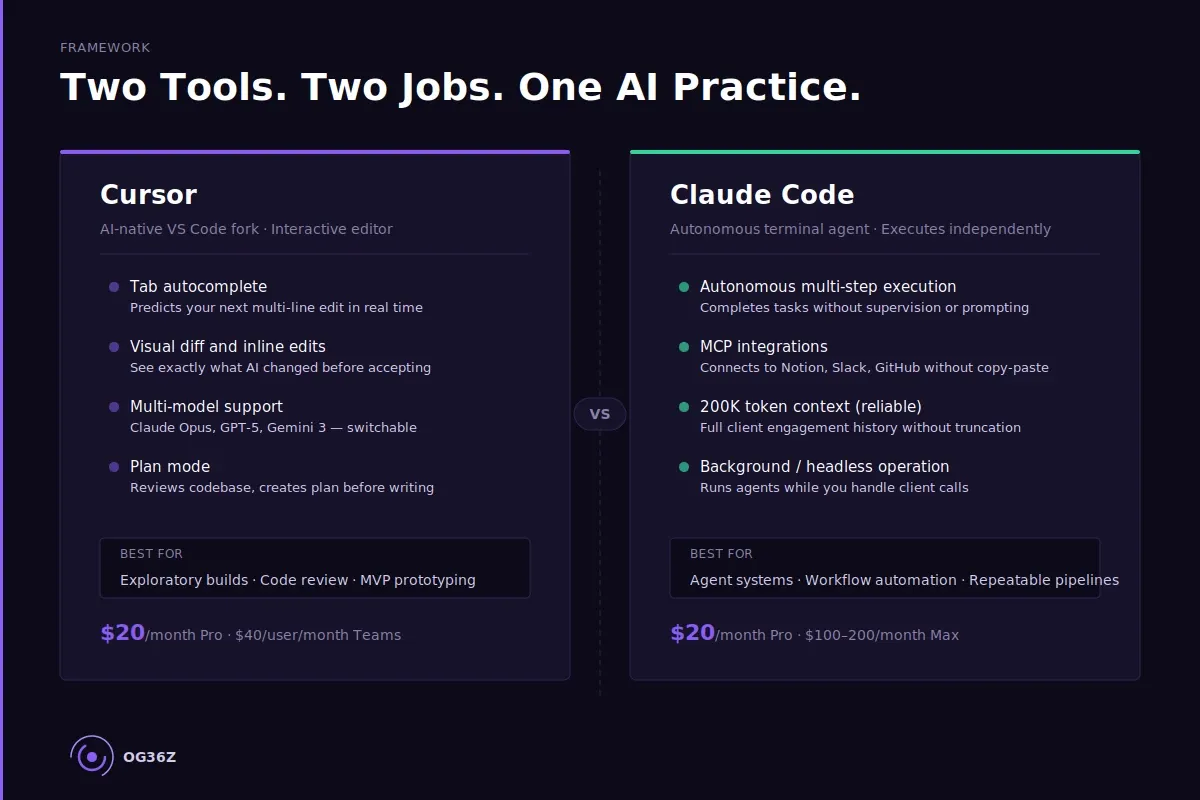
Cursor is an AI-native code editor (a fork of VS Code) that embeds AI assistance directly into your editing experience — real-time autocomplete, inline edits, and a visual diff interface.
Claude Code is Anthropic's autonomous coding agent that runs from the command line and executes multi-step tasks independently, including connecting to external tools like Notion, Slack, and GitHub via MCP integrations.
For a solo consultant building an AI practice, the choice is not which tool is better in general — it is which tool fits the specific task at hand.
WHAT EACH TOOL DOES:
- Cursor — AI-native VS Code fork with real-time tab autocomplete and visual editing
- Claude Code — Autonomous terminal agent with 200K token context and MCP integrations
- Cursor strengths — Fast prototyping, visual diffs, familiar IDE experience for code exploration
- Claude Code strengths — Autonomous execution, external tool connectivity, headless workflow automation
- Shared use — Both tools run Claude Opus 4.5/4.6 as the underlying model
- Solo consultant verdict — Claude Code for building agent systems; Cursor for editing and reviewing code
Cursor and Claude Code are not interchangeable — and using the wrong one for your consulting workflow costs you revision time you are billing at $200 an hour. The comparison most developers run misses the point for consultants: you are not trying to ship software. You are trying to build an AI practice that handles client research, proposal drafting, meeting prep, and deliverable production faster than any competitor who is still prompting from scratch.
The question is not which tool is technically superior. It is which tool is better positioned for the specific jobs a solo consultant needs done — and for some of those jobs, the answer is unambiguous.
What Are Cursor and Claude Code, and What Do They Do for Consultants?
Cursor is an AI-native code editor built as a fork of VS Code, and Claude Code is Anthropic's autonomous AI coding agent that operates from the command line, web browser, or desktop app. Both tools use Claude Opus 4.5 or 4.6 as their primary model, but they represent fundamentally different philosophies about how AI should assist knowledge work.
Cursor is built for interactivity. Its signature feature is tab autocomplete that predicts your next multi-line edit before you type it — a "Tab, Tab, Tab" workflow that accelerates hands-on editing. When you open Cursor, you see a familiar VS Code environment with AI woven into every keystroke. Cursor supports multiple models including GPT-5, Gemini 3 Flash, and Claude Opus, giving it model flexibility that Claude Code does not have.
Claude Code is built for autonomy. You describe a task — "build me a client onboarding agent that reads from this Notion database and drafts a kickoff email" — and Claude Code researches your project, creates a plan, executes across multiple files, and delivers a finished result. It connects to external services through the Model Context Protocol (MCP), which means it can read from Notion, post to Slack, push to GitHub, and interact with your consulting tools without manual copy-paste.
For Sana, the independent consultant billing $200 an hour across four to six active clients, this distinction matters immediately. Cursor is a coding environment. Claude Code is an automation environment. The overlap is real — both can write and edit code — but the primary use case for each is different.
What Is Cursor Better At Than Claude Code for a Solo Consulting Practice?
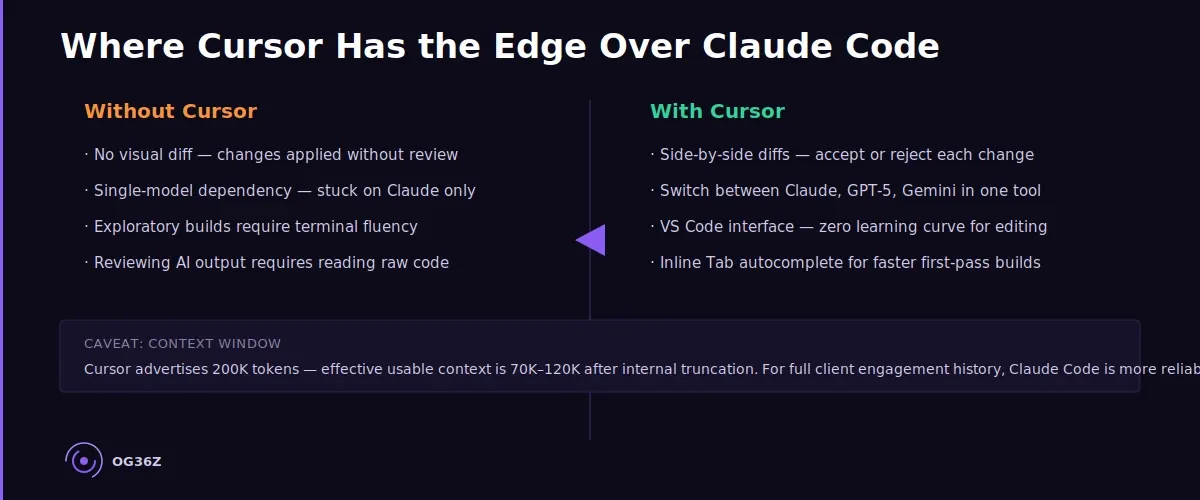
Cursor is better than Claude Code at visual, interactive code editing — and for a consultant who needs to explore, review, or manually modify code, that advantage is real. Cursor's Plan mode researches a codebase, asks clarifying questions, and creates a detailed plan before writing a single line. That transparency is valuable when you want to understand what is being built before it is built.
Cursor's multi-model flexibility is its second structural advantage. A consultant who wants to test GPT-5 against Claude Opus on the same task can run both inside Cursor without switching tools. For practitioners evaluating model performance on specific deliverable types — a comparison that matters when you are billing for the quality of your output — this is useful.
Cursor also ships a faster MVP prototyping experience. Independent testing found Cursor is approximately ten times faster than Claude Code for exploratory builds where speed matters more than precision: quickly scaffolding an agent, prototyping a simple tool, or generating a first-pass script to automate a manual process. If you are in discovery mode — building something to see whether it works before investing in a production version — Cursor's interactive loop is faster.
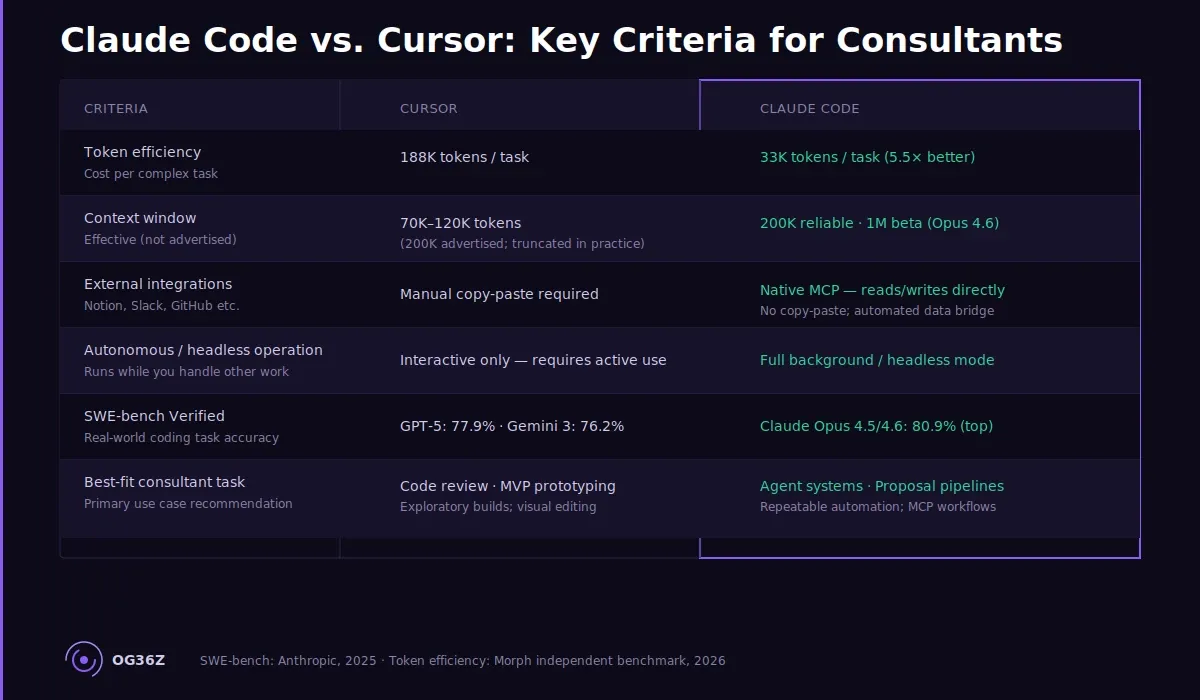
The tradeoff: Cursor's effective context window is smaller than advertised. While Cursor markets a 200K token context window, independent user reports in 2025 and 2026 noted actual usable context of 70K–120K tokens after internal truncation. For a consultant loading a full client context document alongside a complex task prompt, that gap matters.
What Is Claude Code Better At Than Cursor for Consultant-Built Systems?
Claude Code is better than Cursor at autonomous multi-step task execution — and for a consultant building a repeatable agent stack, that is the job that determines practice velocity. Where Cursor assists, Claude Code executes.
The token efficiency difference is substantial. Independent benchmarking found Claude Code uses 5.5 times fewer tokens than Cursor for identical tasks — completing a benchmark task with 33K tokens and no errors where the Cursor agent required 188K tokens and encountered errors along the way. At scale, that efficiency compounds: tasks that cost $15 to run in Claude Code cost approximately $83 in Cursor, before accounting for subscription pricing differences.
The MCP integration layer is Claude Code's clearest structural advantage for consultants. Through MCP, Claude Code connects directly to Notion (client context documents), Slack (team communication), GitHub (code repositories), and dozens of other tools without manual data bridging. A consultant who has built the context layer from Week 2 of the Sprint — client context documents in Notion, structured knowledge per engagement — can instruct Claude Code to read that context and produce a deliverable without copy-pasting anything.
Claude Code's context reliability is also stronger. The full 200K token context window functions as documented, with a 1M token beta available for Claude Opus 4.6. Loading a full client engagement history — meeting notes, stakeholder preferences, project scope, previous deliverables — does not cause truncation at 80K tokens.
The autonomous execution model means Claude Code can run in the background. A consultant working with three active clients can set Claude Code to draft a status update, generate a research brief, and review a scope document — all simultaneously — while handling a client call. That headless capability does not exist in Cursor.
Which Tool Should a Solo Consultant Use — Cursor, Claude Code, or Both?
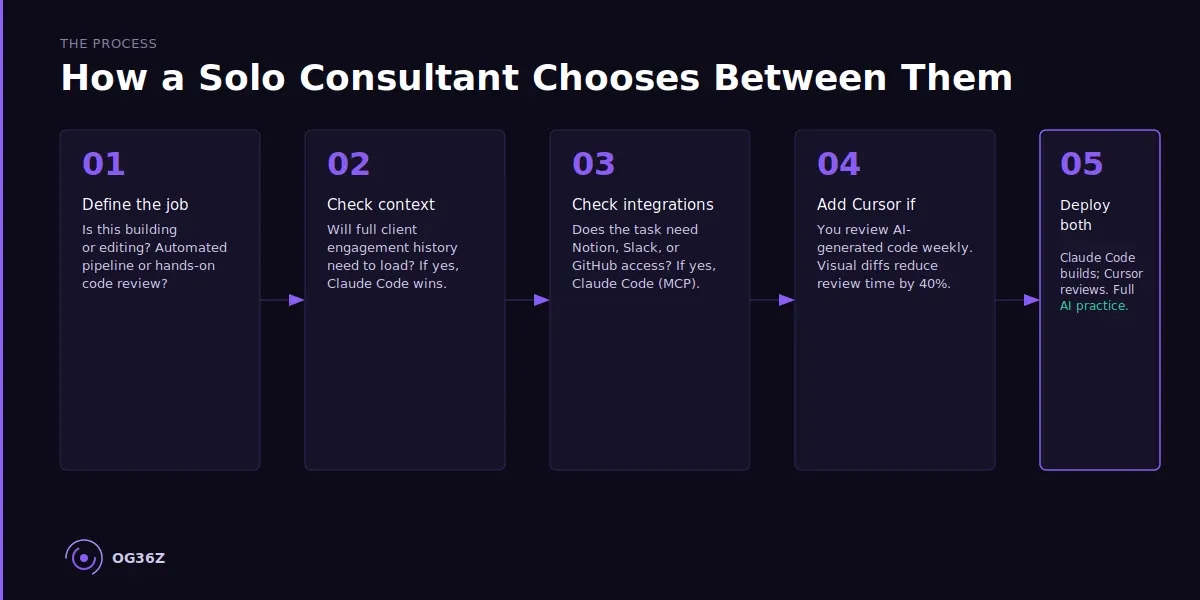
A solo consultant who is building an AI practice should start with Claude Code and add Cursor when code review or interactive editing becomes a frequent workflow requirement. The decision follows from the work, not from the tool's popularity.
If your primary need is building and deploying agents — a client research agent, a proposal drafter, a meeting prep system — Claude Code is the correct starting point. Its autonomous execution, reliable context window, and MCP integrations are purpose-built for the kind of workflow automation that turns a one-person firm into a system that performs like a team.
If you are already writing and editing code regularly — building custom scripts, modifying agent logic, reviewing AI-generated code changes before committing — Cursor's visual interface adds genuine value. The side-by-side diff view, the inline suggestion acceptance workflow, and the familiar VS Code environment reduce the cognitive load of reviewing AI output.
The most effective pattern for AI-native consultants in 2026 is the paired workflow: Claude Code for autonomous execution of defined tasks, Cursor for exploratory builds and interactive code review. Many practitioners run Claude Code as their primary agent and open Cursor when they need to inspect or modify what Claude Code produced. The tools are not competitive — they are complementary.
At Sana's billing rate of $200 an hour, the decision criterion is not which tool costs less per month. It is which tool recovers more billable hours. Claude Code's autonomous execution recovers hours by completing tasks without supervision. Cursor recovers hours by accelerating the editing work that still requires human judgment.
What Does a Cursor and Claude Code Workflow Look Like for an AI-Native Consultant?
A working Cursor and Claude Code setup for a solo consultant operates as a two-layer system: Claude Code handles autonomous task execution and external integrations, while Cursor handles the interactive editing and review layer.
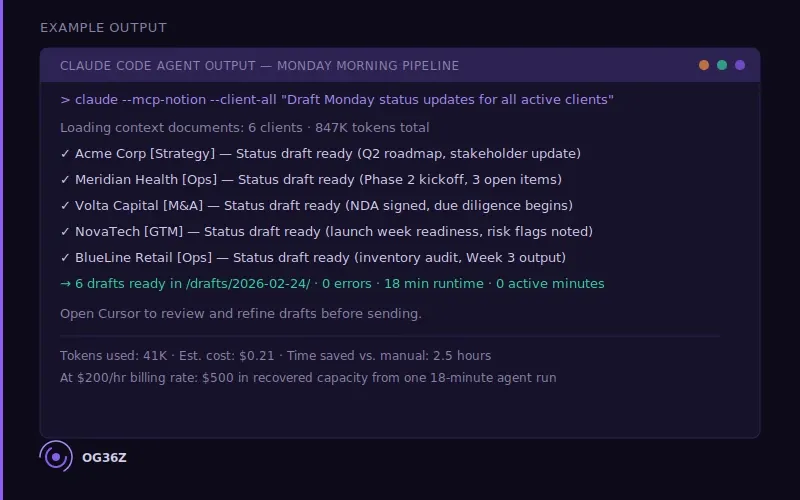
Sana — a fractional strategy consultant with six active clients — runs this workflow during a typical Monday morning. Claude Code connects to her Notion workspace via MCP, reads the context document for each active client (industry context, stakeholder map, project status, previous deliverables), and drafts a weekly status update for each engagement while she reviews her calendar. The drafts arrive in her email folder, ready for review. This takes Claude Code twenty minutes of background execution; it took Sana zero active minutes.
When she opens one of the drafts and needs to restructure the narrative — change the argument architecture, shift the tone for a more conservative stakeholder — she opens Cursor. Cursor's inline editing and suggestion workflow lets her modify the draft section by section, accepting AI suggestions where they fit and rewriting where they do not. The combination of Claude Code's autonomous production and Cursor's interactive refinement produces client-quality output at a fraction of the time a pure manual workflow requires.
The setup requires approximately three hours to configure: install Claude Code, connect MCP to Notion and Slack, load client context documents into Notion using the Sprint's Week 2 template, and install Cursor. After configuration, the workflow runs with two to five minutes of active setup per task cycle.
Summary
Cursor and Claude Code solve different problems. Cursor is the right tool for interactive code editing, visual review, and exploratory prototyping. Claude Code is the right tool for autonomous execution, repeatable agent workflows, and external tool integration via MCP.
For a solo consultant building an AI practice, Claude Code delivers the higher-leverage capability — the ability to run agents in the background, connect to consulting tools without manual bridging, and complete complex multi-step tasks without supervision. Cursor adds value as the code review and editing layer when the work requires human-in-the-loop refinement.
At $200 an hour, the question to ask about any AI tool is: how many hours per week does this return? Claude Code, deployed correctly with the context layer built, returns eight to twelve hours per week for a consultant working across four to six clients. Cursor returns two to four hours per week for the editing and review work that benefits from a visual interface. The most effective solo consulting AI practice uses both.