
How to Build and Actually Maintain a Consulting Knowledge Base
A consulting knowledge base fails not because it is disorganized but because maintenance is never designed into the system as a weekly ritual.
KEY TAKEAWAYS
- Most consulting knowledge bases collapse within six weeks because maintenance is never designed into the system
- Content type determines structure — client artifacts, methodology, research, and templates each need a distinct home
- A 15-minute weekly review protocol is the single highest-leverage maintenance habit you can install
- Tool choice matters less than the discipline of a weekly ritual — any major tool can work if the ritual exists
What does it take to build a consulting knowledge base that does not collapse?
Structure content into four typed buckets, tag for retrieval rather than storage, and install a 15-minute weekly review as a non-negotiable calendar block. The failure mode is not poor organization — it is the absence of a maintenance ritual from day one.
KNOWLEDGE BASE CONTENT TYPES:
- Client artifacts — deliverables, meeting notes, decision logs per engagement
- Methodology — frameworks, process templates, repeatable approaches
- Research — industry data, competitor intelligence, reference material
- Operations — contracts, invoicing templates, onboarding docs
- Capture inbox — unprocessed inputs awaiting weekly triage
Sana built her first knowledge base in Notion two years ago. She spent a weekend designing the hierarchy, migrated three years of notes into it, and felt, briefly, like she had solved a real problem. Six weeks later the system was a graveyard. New deliverables were going into a catch-all dump folder. Her framework library had six untitled pages. She had stopped searching it entirely and was starting from scratch on work she had done before.
The second attempt, in Obsidian, lasted four months before the same thing happened. The third attempt, in a combination of Google Drive folders and Notion databases, still exists today — but she is not sure she trusts it.
The failure was not organizational. Sana's taxonomies were sensible. The categories were correct. The problem was simpler: she had never designed maintenance into the system. A knowledge base without a maintenance ritual is not a system — it is an expensive digital filing cabinet that accumulates entropy. The fix is not a better tool or a better taxonomy. It is a 15-minute weekly ritual that processes inputs, updates active records, and prunes dead content before it decays into noise.
What belongs in a solo consulting knowledge base?
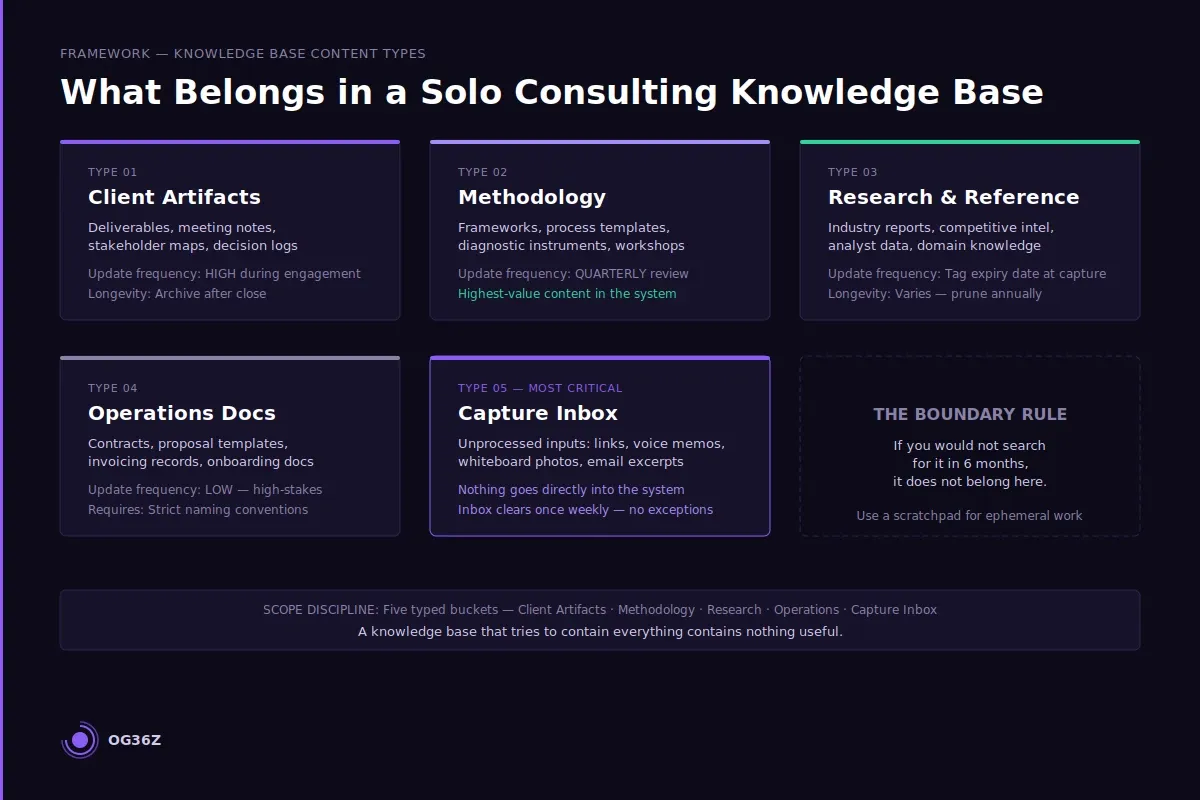
Before architecture, there is scope. A knowledge base that tries to contain everything contains nothing useful. For independent consultants operating in B2B services, content falls into five distinct types — and each type has different retrieval requirements, update frequencies, and longevity.
Client artifacts are engagement-specific: meeting notes, deliverables, stakeholder maps, decision logs, and email threads worth preserving. They are high-frequency during an engagement and near-zero after it closes. They belong in a client-specific structure, not mixed with evergreen content. The key retention question is: what would I need if this client re-engaged in 18 months?
Methodology content is your durable intellectual property — frameworks you have developed, process templates you reuse, diagnostic instruments, workshop designs. This is the highest-value content in the system and the most neglected. Every time you rebuild a framework from scratch instead of iterating the stored version, you are paying a rework tax. Methodology content should be version-controlled and reviewed quarterly.
Research and reference material includes industry reports, competitive intelligence, analyst data, and domain knowledge. Shelf life varies — some reference material is perennial, some expires in 12 months. Tag with an expiry review date at capture.
Operations documents — contracts, proposal templates, invoicing records, onboarding checklists — are low-frequency but high-stakes. One missed clause or one lost contract template is expensive. These belong in a dedicated operational section with clear naming conventions.
Capture inbox is the most important category that most people do not build. Every new input — a link, a voice memo, a photo of a whiteboard, a copied email — goes into the inbox first. Nothing else touches the system during the week. The inbox gets processed once a week, during the maintenance ritual. Without an inbox, new content either gets misfiled in the moment (bad) or skipped entirely (worse).
The practical boundary: if you would not search for it in six months, it does not belong in the knowledge base. Ephemeral notes, draft thinking, and in-progress work belong in a scratchpad, not in a system designed for retrieval.
How do you structure a knowledge base so content is actually findable?
The critical insight about knowledge base structure is that organization is for storage but tagging is for retrieval — and most consultants optimize only for storage. A perfectly hierarchical folder structure fails the moment a piece of content belongs in two places simultaneously. Tags solve this. Folders contain; tags connect.
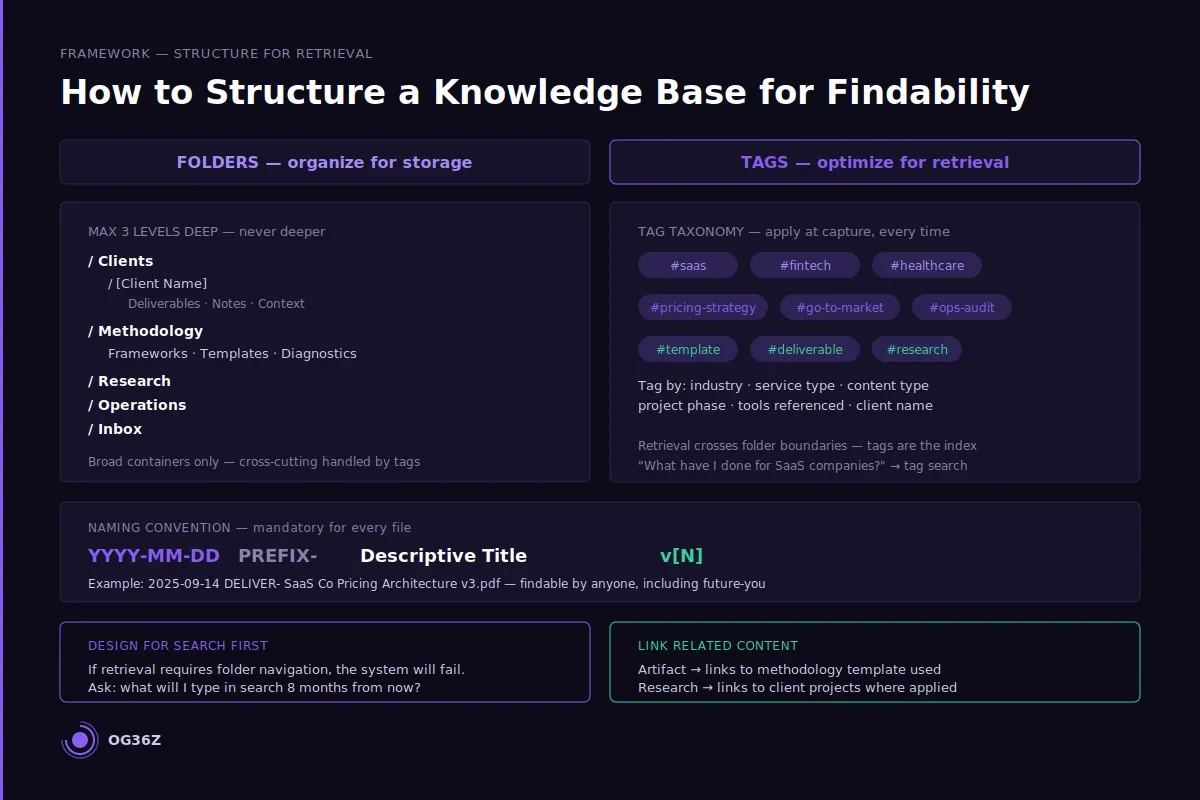
The structural model that survives in practice for solo consultants is a shallow hierarchy — never more than three levels deep — combined with a mandatory tagging protocol at capture. The folder structure handles broad buckets: Clients, Methodology, Research, Operations, Inbox. Tags handle retrieval across those buckets: by industry vertical, by service type, by content type, by project phase, by tool referenced.
Naming conventions are not optional. Every file needs a date prefix (YYYY-MM-DD), a content type prefix (NOTE-, TEMPLATE-, REPORT-, DELIVER-), and a descriptive title. A file named "Final v3 updated REAL.docx" is irretrievable six months later. A file named "2025-09-14 DELIVER- SaaS Co Pricing Architecture v3.pdf" is findable by anyone, including future-you.
Search must be the primary retrieval method. If your knowledge base requires navigation — clicking through folders to find things — it will fail under load. Design for search from day one. This means descriptive titles, consistent tags, and body text that includes the terms you will actually search for later. When you save a deliverable, ask: what will I type into the search bar in eight months when I need this? Put those words in the title or the first line of the description.
Link related content. A client artifact should link to the methodology template it instantiated. A research report should link to the client projects where it was applied. These bidirectional links transform a filing system into a knowledge network — the difference between a warehouse and an index.
The most common structural mistake is creating a new folder for every new project and ignoring the tagging system. After 18 months of consulting work, this produces 40 project folders with no cross-referencing, no methodology consolidation, and no way to answer the question: "What have I done for SaaS companies?" Tag by industry from the start. Your future self will search by industry, not by client name.
What is the weekly maintenance protocol that keeps a knowledge base alive?
The 15-minute weekly review is the single intervention that separates working knowledge bases from abandoned ones. It is not glamorous. It is not a deep review session. It is a triage ritual that processes the inbox, updates three to five active records, and catches decay before it compounds.
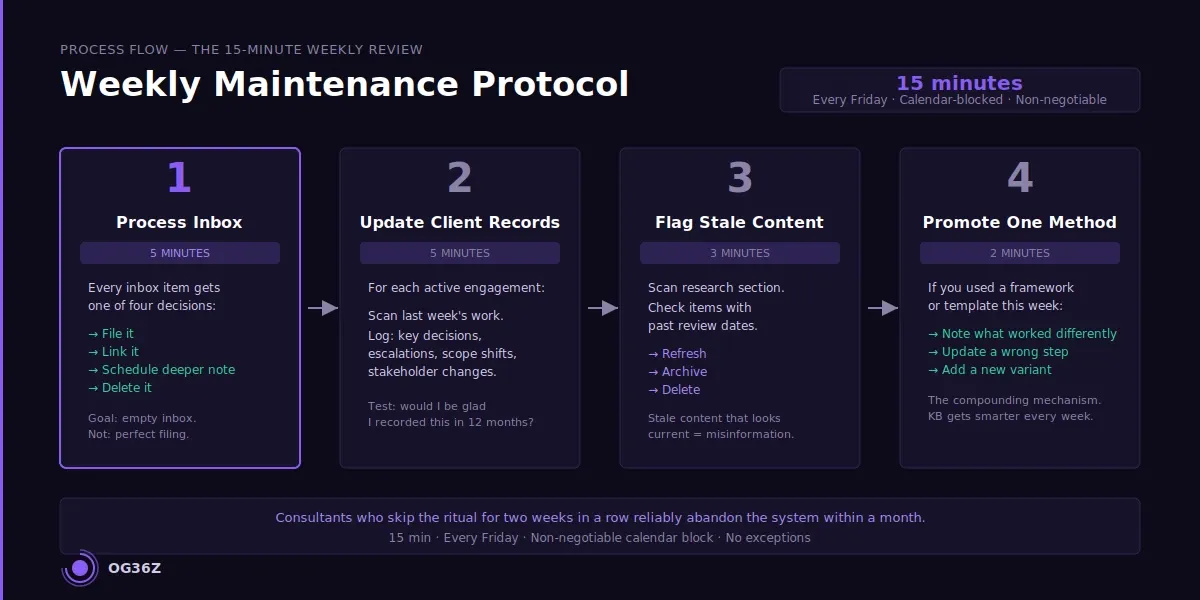
The protocol runs in four steps, sequenced to fit within 15 minutes.
Step 1 — Process the inbox (5 minutes). Every item in the capture inbox gets one of four decisions: file it to the right location, link it to an existing record, schedule it for a deeper note (this week), or delete it. Nothing stays in the inbox. The inbox is a buffer, not a home. If an item takes more than 60 seconds to file, drop a placeholder and move on — the goal is an empty inbox, not perfect filing.
Step 2 — Update active client records (5 minutes). For each active engagement, scan the last week's work and ask: did anything happen that future-me needs to retrieve? Key decisions, escalations, stakeholder changes, and scope shifts are worth 30 seconds to log. Routine meeting notes are not. The test is: would I be glad I recorded this in 12 months?
Step 3 — Flag expiring or stale content (3 minutes). Scroll the research and reference section. Anything tagged with a review date that has passed gets a status update — either refreshed, archived, or deleted. Stale content that looks current is worse than no content. It is misinformation.
Step 4 — Promote one methodology note (2 minutes). If you used a framework or template this week, spend two minutes improving the stored version. Add a note about what worked differently this time, update a step that proved wrong in practice, or add a new variant you discovered. This is the compounding mechanism — the knowledge base gets smarter every week at almost zero marginal cost.
Fifteen minutes. Every Friday before close. Calendar-blocked, non-negotiable. Consultants who skip it for two weeks in a row reliably abandon the system within a month.
How do you migrate existing notes and documents into a functional knowledge base?
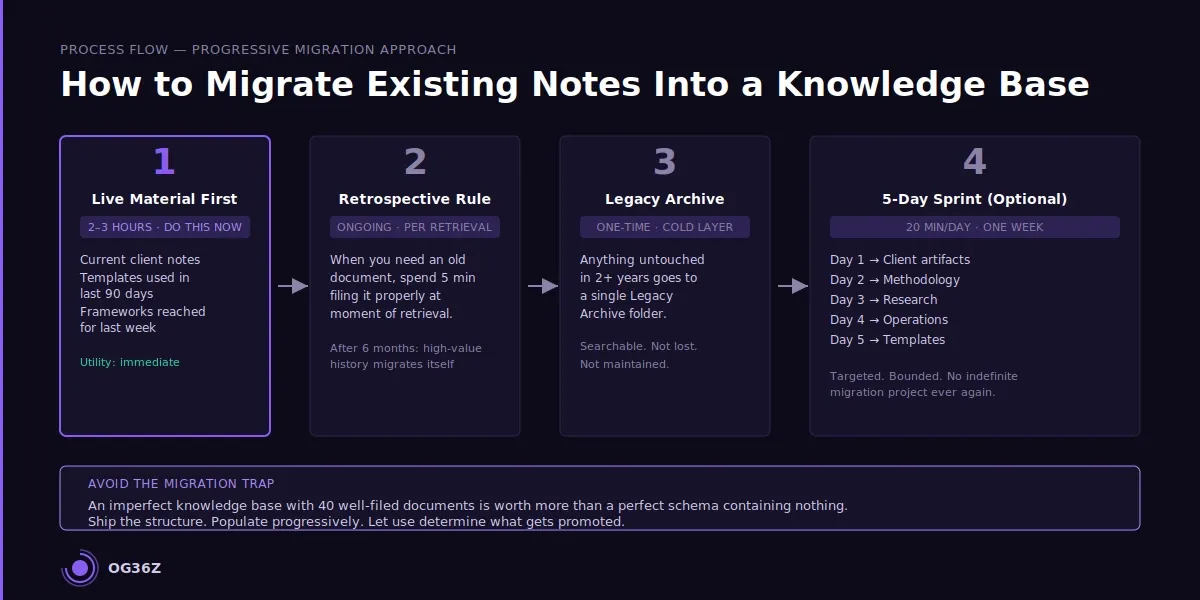
Migration is where most knowledge base attempts die before they begin. The impulse is to migrate everything — to go back through years of notes and documents and build the perfect retrospective archive. This is the wrong instinct. A complete migration is an indefinite project that delays the actual benefit of the system by weeks or months, and the material you migrate from three years ago is rarely what you need tomorrow.
The correct migration approach is progressive and bounded.
Migrate the live material first. Start with what is active right now: current client engagement notes, templates you used in the last 90 days, the frameworks you reached for last week. These are the files that create immediate value when they are findable. Migration time: two to three hours. System utility: immediate.
Apply the retrospective rule. For all historical material, apply a simple rule: when you need it, you migrate it. If you reach for a document from two years ago, spend five minutes filing it properly at the moment of retrieval. This converts migration from a project into a habit. After six months, the high-value historical material will have migrated itself through use.
Create a legacy archive folder. Everything that has not been touched in two years and has not been actively migrated goes into a single Legacy Archive folder. It is searchable, it is not lost, but it does not pollute the active system. Treat it as a cold layer — accessible but not maintained.
Run a five-day sprint for targeted migration. Spend 20 minutes per day for one week migrating one category per day: client artifacts, methodology, research, operations, templates. At the end of the week you have migrated the material most likely to generate future value without the indefinite burden of a complete migration project.
The migration trap is perfectionism. An imperfect knowledge base with 40 well-filed documents is worth more than a perfect knowledge base schema containing nothing. Ship the structure, populate it progressively, and let use determine what gets promoted.
Which tools support a sustainable consulting knowledge base?
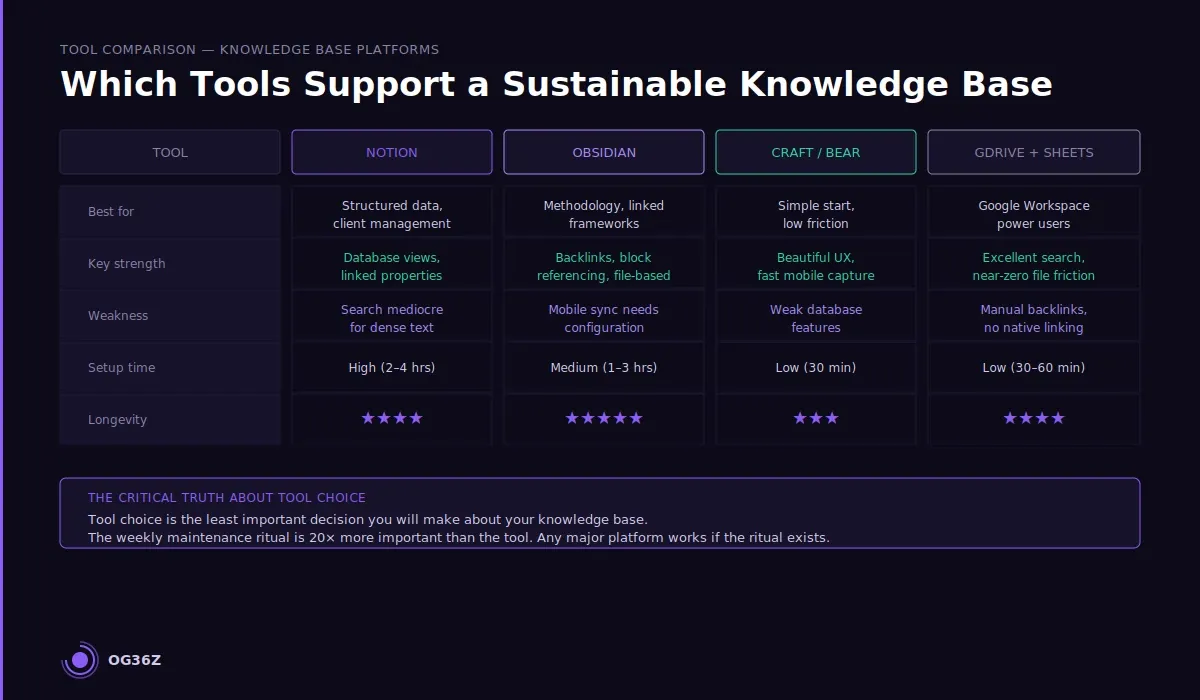
Tool choice is the least important decision you will make about your knowledge base, and it receives the most attention. The weekly maintenance ritual is 20 times more important than the tool. That said, tool friction is real — a system that is slow to open, hard to search, or awkward to capture into will be avoided — so the practical tool criteria matter.
Notion is the highest-adoption choice for solo consultants. Its database features handle the client artifact structure well, linked properties replace manual cross-referencing, and filtered views let you build a "current engagements" dashboard that surfaces what you need without navigating. Weakness: search is mediocre for dense text content, and the mobile app is slow. Best for consultants whose knowledge base is primarily structured data.
Obsidian excels at methodology content and heavily linked thinking. The graph view is less useful than it looks, but the backlink system and block referencing are genuinely powerful for building a connected methodology library. Weakness: no native mobile capture that syncs reliably without configuration overhead. Best for consultants who think in frameworks and want a durable, file-based system they own.
Craft and Bear occupy a middle ground — beautiful writing environments with reasonable linking and tagging, lower setup friction than Notion or Obsidian, and fast mobile capture. Weakness: less powerful database features for client management. Best for consultants who want simplicity over configurability.
Google Drive + Sheets hybrid is underrated. A well-structured Drive with consistent naming conventions and a single Sheets index (document name, type, client, date, tags, link) can outperform elaborate Notion setups because the search is excellent and the friction to file is near-zero. Weakness: linking and backlinks require manual maintenance. Best for consultants who already live in Google Workspace.
See Post 226 for a detailed tool comparison across Notion, Airtable, and Obsidian. See Post 210 for the broader knowledge management framework for independent consultants. See Post 211 for the second-brain methodology applied to solo consulting work.
Summary
A consulting knowledge base fails not because it is disorganized but because maintenance is never designed into the system as a weekly ritual. The architecture matters — five content types, shallow folder hierarchy, mandatory tags, search-optimized naming — but architecture without a maintenance protocol decays within weeks.
The 15-minute Friday review processes the inbox, updates active records, flags stale content, and promotes one methodology improvement. That single ritual, installed as a non-negotiable calendar block, is the difference between a knowledge base that compounds value over years and one that gets abandoned before spring.
Migration should be progressive: migrate live material immediately, apply the retrospective rule for historical content, and use a five-day sprint to clear high-value categories. Tool choice should follow friction assessment — the best tool is the one you will actually open and use under load on a Tuesday at 6 p.m.
The compounding payoff is real. A maintained knowledge base after two years means never rebuilding a framework from scratch, never losing a decision log, and never starting a new engagement for a familiar industry without a head start. For a consultant billing at $200 to $400 per hour, the recovered time pays back the maintenance investment in the first month.