
The Client Onboarding Workflow Every Independent Consultant Needs
The complete workflow has five components: welcome sequence, onboarding questionnaire, access checklist, kickoff agenda template, and first-week deliverable confirmation.
KEY TAKEAWAYS
- The onboarding experience sets the client's expectation for the entire engagement — it is the first delivery, not an admin task.
- A documented onboarding workflow is the fastest way to increase perceived professionalism and cut non-billable setup time.
- A solo consultant can build a complete onboarding workflow in one afternoon — and reuse it across every engagement type.
- The first 24 hours after a client signs are the highest-leverage window for establishing process confidence.
What does a client onboarding workflow for consultants include?
A client onboarding workflow for independent consultants is a documented sequence of steps — from contract signature to first substantive delivery — that standardizes the client's first experience and eliminates the back-and-forth that costs hours of non-billable time.
It covers welcome communication, information gathering, tool and access setup, kickoff meeting preparation, and first-week deliverable confirmation.
A solo consultant with a documented workflow delivers a consistent, professional experience on every engagement, regardless of engagement type or client size.
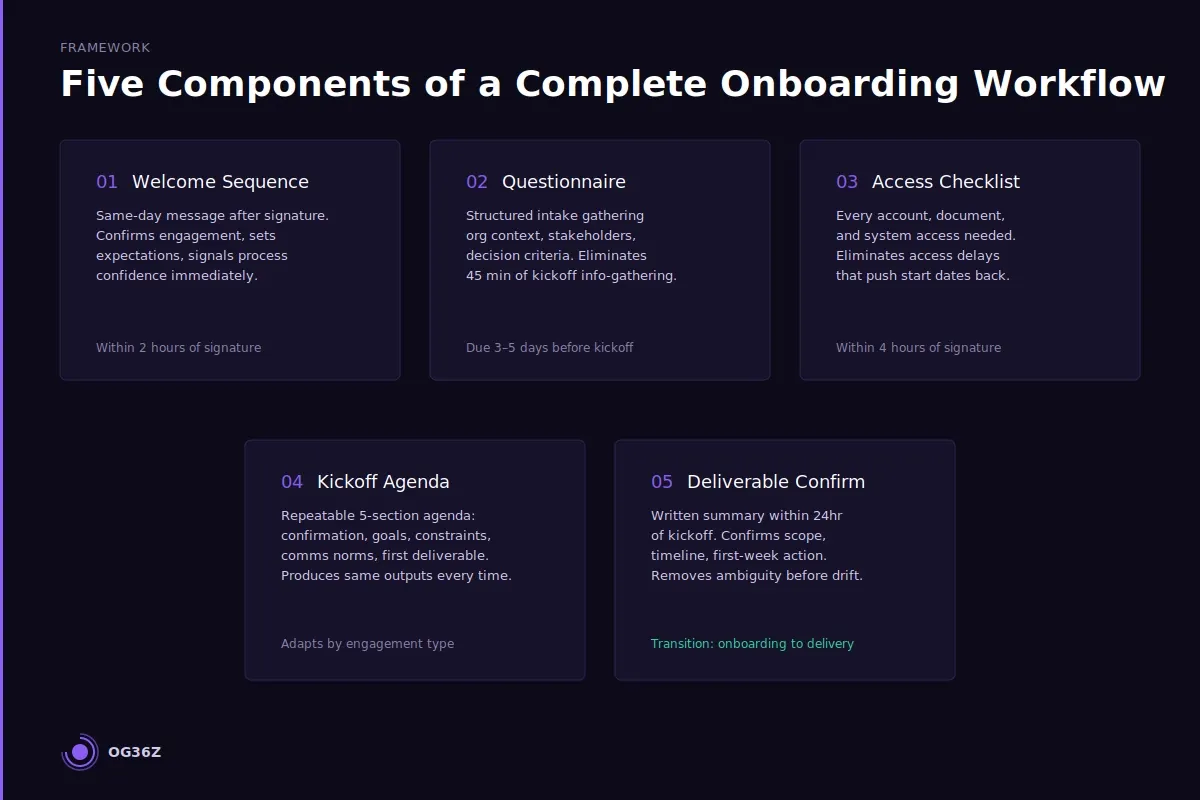
CORE COMPONENTS:
- Welcome sequence — a same-day message that confirms the engagement, sets expectations, and signals process confidence
- Onboarding questionnaire — a structured intake form that gathers everything needed before the kickoff call
- Access and tool setup checklist — a list of every account, document, and system access required before work begins
- Kickoff agenda template — a repeatable structure for the first meeting that surfaces goals, constraints, and communication norms
- First-week deliverable confirmation — a written summary sent after kickoff that confirms scope, timeline, and next action
The onboarding experience sets the client's expectation for everything that follows. Independent consultants who lack a documented onboarding workflow are not just being inefficient — they are actively shaping client confidence in the wrong direction.
Sana, an independent strategy consultant billing $200 per hour, handles onboarding informally. She sends a welcome email when she remembers. She gathers information on the kickoff call because there is no intake form to complete beforehand. She explains her process in a different order every time because there is no written process to follow. Each client's first week is different — not because the engagements are different, but because Sana reconstructs the onboarding from scratch each time. The result: clients have uneven first impressions, and Sana burns three to five hours on avoidable back-and-forth per engagement before billable work begins.
A documented onboarding workflow converts those hours into a single afternoon of build time. The workflow is reused on every engagement, adapted at the margin for each client, and delivers a consistent signal — from the first message to the first deliverable — that this consultant has done this before and knows exactly what she is doing.
What does a complete consulting client onboarding workflow include?
A complete consulting client onboarding workflow includes five sequential components: a welcome sequence, an onboarding questionnaire, an access and tool setup checklist, a kickoff agenda template, and a first-week deliverable confirmation. These five components cover the client's entire experience from contract signature to the moment substantive work begins.
Each component handles a specific job in the transition from sold engagement to active delivery:
Welcome sequence. The welcome sequence is a same-day communication sent immediately after the contract is signed. It confirms the engagement, introduces the onboarding process, provides the questionnaire link, and sets a clear expectation for what happens next. A solo consultant who sends this message within two hours of signature communicates competence and process clarity before any work has been delivered. The welcome sequence is not a warm message — it is an operational signal.
Onboarding questionnaire. The questionnaire gathers every piece of information the consultant needs before the kickoff call: organizational context, stakeholder map, prior work on this problem, communication preferences, and decision-making structure. When the questionnaire is completed before the kickoff, the kickoff call can focus on alignment and planning rather than information collection. A 20-question intake form delivered well eliminates 45 minutes of kickoff call time and ensures the consultant arrives prepared. See How to Onboard a New Consulting Client in 48 Hours for the exact questionnaire format.
Access and tool setup checklist. A list of every account, document, shared workspace, and system access the consultant needs to begin work — with instructions for how to grant each one. Sent with the welcome sequence and tracked until complete, this checklist eliminates the access delays that push project start dates back by days. The checklist is generic at the template level and takes five minutes to adapt per engagement.
Kickoff agenda template. A repeatable agenda for the first meeting that covers five items: engagement confirmation, goal and success metric alignment, constraint and risk identification, communication norms and check-in cadence, and first-week deliverable commitment. The kickoff agenda template ensures every kickoff produces the same outputs — regardless of how the conversation flows or how much the client digresses. See The Client Kickoff System for Independent Consultants for the full kickoff structure.
First-week deliverable confirmation. A written summary sent within 24 hours of the kickoff call. It confirms what was agreed, names the specific deliverable for the first week, and identifies the single most important question the consultant needs answered before progress is blocked. This document is the transition from onboarding to delivery. A client who receives it feels informed; a consultant who sends it removes the ambiguity that causes scope drift. See Consulting Client Onboarding Checklist: What to Cover in the First Week for the complete first-week coverage.
What should happen in the first 24 hours after a client signs?
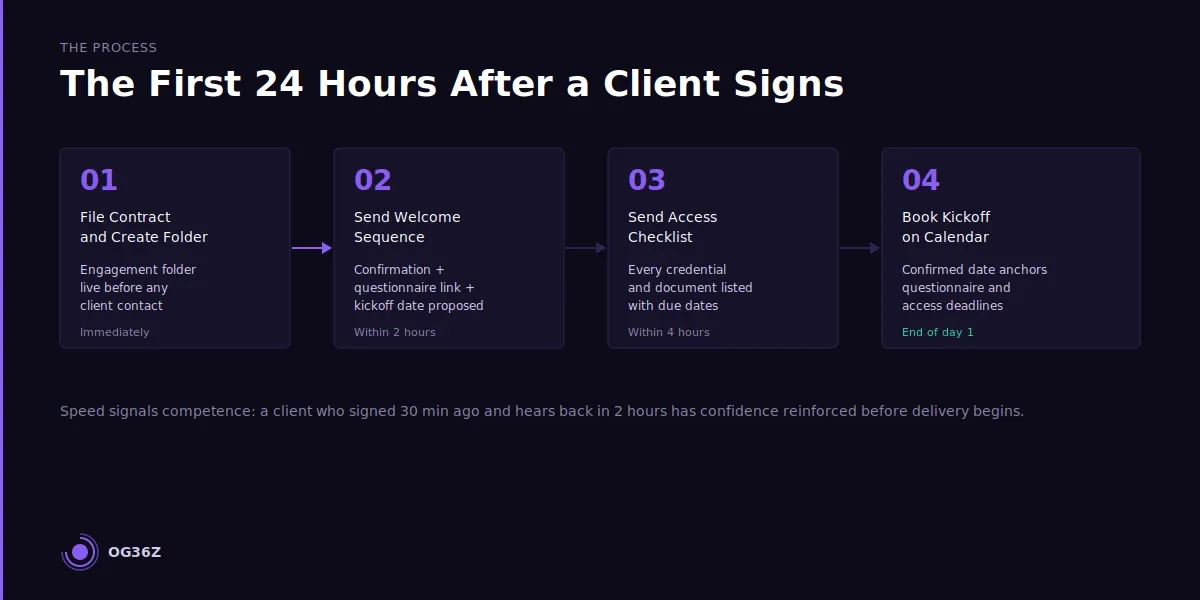
The first 24 hours after a client signs are the highest-leverage window in the entire engagement for establishing process confidence. Four specific actions should happen in this window: contract confirmation and filing, welcome sequence delivery, questionnaire link delivery, and access checklist delivery.
The sequence matters. Each action builds on the previous one and creates a specific signal in the client's mind about the kind of consultant they have engaged.
Within two hours of signature: contract confirmation and welcome sequence.
The contract file is saved to the engagement folder. The welcome sequence is sent. This message should include: a direct acknowledgment of the signed agreement, a brief statement of what the onboarding process looks like and why it is structured this way, a link to the onboarding questionnaire with a requested completion date (three to five days before the kickoff), and a proposed kickoff date based on the agreed timeline.
The speed of this response matters. A client who signed thirty minutes ago and receives a professional onboarding email within two hours has their confidence in the engagement immediately reinforced. A client who hears nothing for 48 hours begins to wonder if the energy that drove the sale will persist into delivery.
Within four hours of signature: access checklist delivery.
The access checklist is sent as part of the welcome sequence or as a direct follow-up. It lists every item the client needs to provide — shared folder access, data sources, internal documents, relevant contacts — with a simple format: item name, what it is, how to share it, and due date. The earlier this list is in the client's hands, the earlier the access process begins, and the less likely it is to delay the project start.
Day 2: questionnaire follow-up.
If the questionnaire has not been opened by the following morning, a brief, direct follow-up is sent. Not an apology for asking, not a hedge — a one-line reminder with the link and the due date. Clients who complete the questionnaire before the kickoff produce significantly better kickoff conversations. This follow-up is a service to the engagement, not a chore.
By end of day 1: kickoff meeting booked.
The kickoff is on the calendar within 24 hours of signature. With a specific date anchoring the onboarding sequence, the questionnaire deadline and access deadline both have a natural backstop. An onboarding without a confirmed kickoff date drifts.
How do you create an onboarding checklist that works across different engagement types?
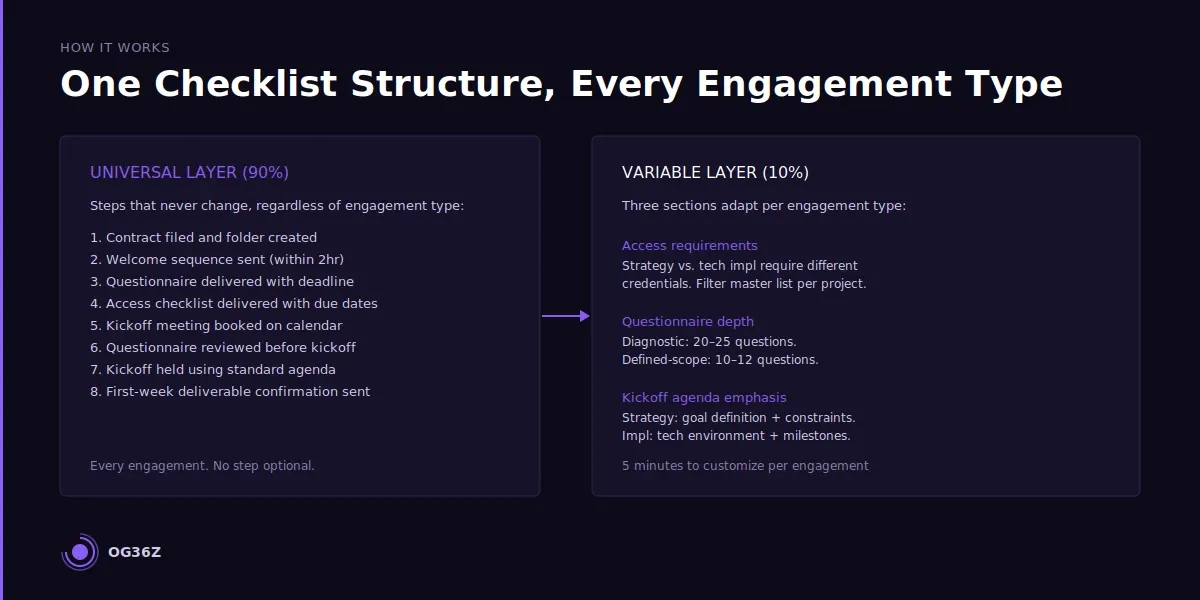
A cross-engagement onboarding checklist works by separating universal steps from engagement-specific variables — the core sequence is fixed; the content of each step adapts per engagement. A consultant who builds the checklist with this separation can reuse ninety percent of the structure on every engagement and spend five minutes customizing the remaining ten percent.
The universal layer: steps that apply to every engagement.
These steps never change regardless of engagement type, client size, or project scope:
- Contract filed and engagement folder created
- Welcome sequence sent within two hours
- Onboarding questionnaire delivered with completion deadline
- Access checklist delivered with due dates
- Kickoff meeting booked
- Questionnaire reviewed before kickoff
- Kickoff meeting held using standard agenda
- First-week deliverable confirmation sent within 24 hours of kickoff
This eight-step universal sequence is the checklist at its core. Every engagement gets every step. No step is optional.
The variable layer: three engagement-specific sections.
Three sections of the checklist vary by engagement type:
Access requirements. A strategy engagement may require access to internal strategy documents, financial data, and a stakeholder contact list. A technology implementation may require access to the technology platform, integration documentation, and a technical point of contact. The access checklist template contains a list of common access types — each new engagement takes ten minutes to filter and annotate.
Questionnaire depth. A diagnostic engagement uses a longer questionnaire (20 to 25 questions) to surface organizational context that will shape the findings. A defined-scope delivery engagement uses a shorter questionnaire (10 to 12 questions) focused on logistics and stakeholder alignment. The questionnaire template contains a master list of questions organized by category — each engagement selects the relevant subset.
Kickoff agenda emphasis. A strategy engagement kickoff prioritizes goal definition and constraint mapping. An implementation kickoff prioritizes technical environment review and milestone sequencing. The kickoff agenda template contains all five standard sections — emphasis and time allocation shift by engagement type without changing the structure.
The practical test for whether a checklist works across engagement types: every step on the list should have a named owner, a named output, and a specific deadline. A checklist that meets this standard is deployable on any engagement with minimal customization and tracks completion without ambiguity.
What tools should solo consultants use to automate onboarding steps?
Solo consultants should use tools that reduce the manual coordination required per onboarding without introducing a platform overhead that consumes more time than it saves. The highest-leverage onboarding automation for a solo practice is questionnaire delivery and completion tracking — not workflow software that requires more setup than the onboarding itself.
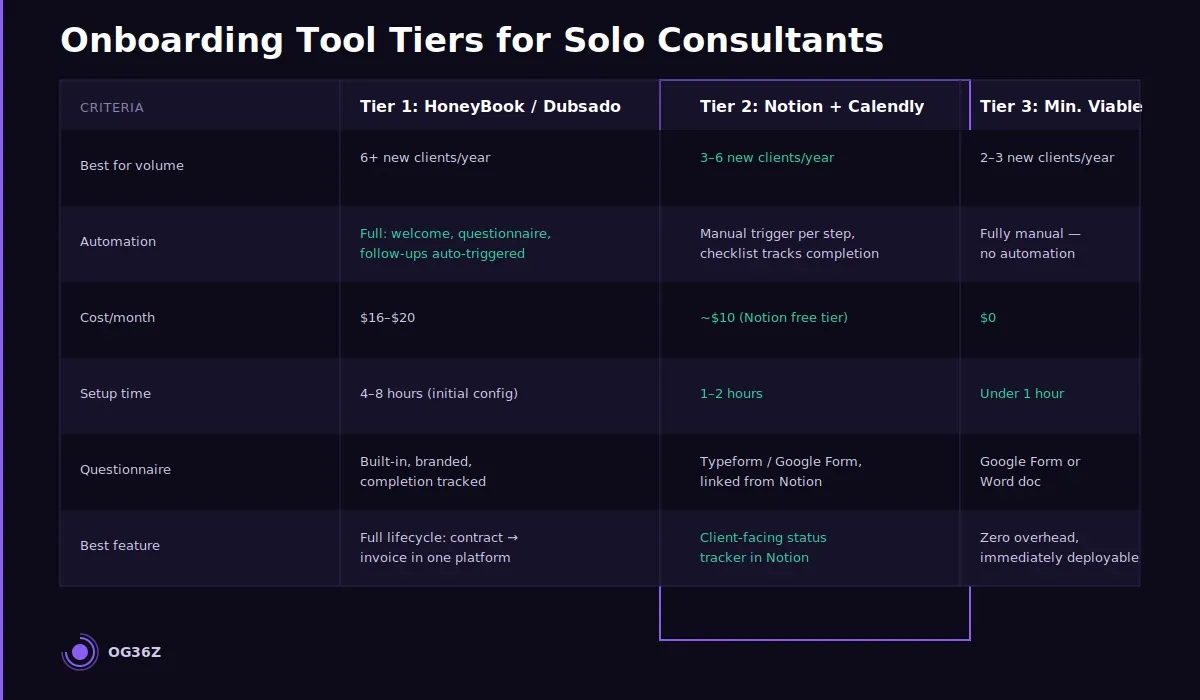
The tool landscape for solo consultant onboarding automation breaks into three practical tiers:
Tier 1: Full practice management platforms.
HoneyBook and Dubsado both bundle onboarding automation into a practice management suite. Both support automated welcome sequences, questionnaire delivery, contract templates, and follow-up reminders triggered by contract signature. For a consultant handling six or more new clients per year, the automation value is real: the welcome sequence sends itself, the questionnaire link follows automatically, and follow-up reminders require no manual action. HoneyBook starts at $16 per month; Dubsado at $20 per month. Both tools pay for themselves in under one recovered hour per onboarding cycle.
The limitation of full platforms is setup time and feature depth. A consultant who needs a simple, fast onboarding workflow may find HoneyBook's full feature set more friction than benefit.
Tier 2: Document-plus-automation tools.
Notion (for checklist and questionnaire storage) combined with Calendly (for kickoff scheduling) and a Gmail template folder (for welcome and follow-up sequences) is the most common setup for solo consultants who want structured onboarding without a dedicated platform. This combination requires manual triggering of each step — the consultant sends the welcome email, opens Calendly for the kickoff booking, and checks the questionnaire completion — but it uses tools already in the workflow rather than introducing a new platform.
The Notion onboarding checklist doubles as a client-facing status tracker — shared with the client so both parties can see what is complete and what is outstanding. This transparency reduces follow-up emails and replaces them with a single shared source of truth.
Tier 3: Minimum viable setup.
A Google Doc onboarding checklist, a Typeform or Google Form questionnaire, and Gmail for all communication is sufficient for a consultant handling two to three new clients per year. The checklist is copied per client, each step is checked off manually, and the questionnaire link is included in the first welcome email. No automation, no platform — but the workflow is documented, repeatable, and significantly better than informal onboarding.
The tool decision follows from onboarding volume. A consultant onboarding six or more clients per year benefits from HoneyBook or Dubsado automation. Below that threshold, the Notion-plus-Calendly setup or the minimum viable setup delivers the systematic consistency without the platform overhead.
How do you know when your onboarding workflow is working?
An onboarding workflow is working when three observable outcomes are consistent: clients arrive at the kickoff call prepared, the first week of every engagement begins without access delays, and the consultant spends fewer than two hours on onboarding coordination per new client. These three signals are measurable without tracking software or client surveys.
Signal 1: Questionnaire completion before kickoff.
When the questionnaire is consistently completed three to five days before the kickoff call, the onboarding communication is working. Completion rates below 70 percent across the last five engagements indicate either that the questionnaire is too long, the welcome sequence does not communicate urgency clearly enough, or the follow-up reminder is not being sent. Each failure mode has a specific fix.
Signal 2: No access delays in the first week.
If the first week of an engagement regularly begins with a missing access credential or an unfound document, the access checklist is either not being sent early enough or lacks the specificity needed for the client to act on it. The fix is to add item-level instructions (not just item names) and to move the access checklist delivery to within four hours of signature rather than day two or three.
Signal 3: Less than two hours of non-billable onboarding coordination.
Track the time spent on onboarding coordination for the next three engagements — from signature to the end of the first week. If the total consistently exceeds two hours, identify the steps that consumed the most time. The most common culprits are questionnaire follow-up, access chasing, and kickoff rescheduling. Each is a specific checklist or communication failure, not a general onboarding problem.
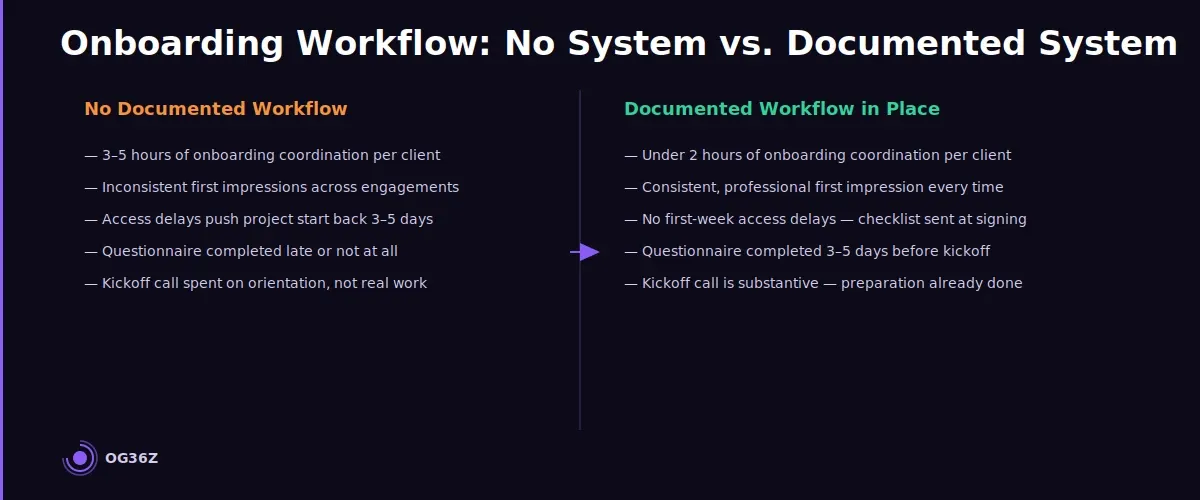
The before-state and after-state are concrete.
Before a documented workflow: Sana spends three to five hours per onboarding, clients have inconsistent first impressions, and access delays push project start dates back by three to five days. After a documented workflow: onboarding coordination takes under two hours, the kickoff call is substantive because preparation is complete, and the first-week deliverable confirmation removes scope ambiguity before it can become scope drift. The shift is not subjective — it shows up in hours recovered and in client feedback on the engagement's early weeks.
Summary
A client onboarding workflow is not an administrative nicety — it is the first delivery in every engagement and the most reliable signal of what the rest of the engagement will look like.
The complete workflow has five components: welcome sequence, onboarding questionnaire, access checklist, kickoff agenda template, and first-week deliverable confirmation.
The first 24 hours after signature are the highest-leverage window; the welcome sequence and access checklist should be in the client's inbox within two to four hours of signing.
Tool selection depends on onboarding volume — HoneyBook or Dubsado for six or more clients per year, Notion-plus-Calendly for lower volume, and a minimum viable setup for two to three clients annually.
A working workflow shows three consistent signals: questionnaire completed before kickoff, no first-week access delays, and under two hours of non-billable onboarding coordination per engagement.
The solo consultant who builds this workflow stops reinventing first impressions and starts delivering them.